
/docs
Android offline sdk
0.Integration to prepare
Dependency
- Android API Level >=14 (Android 4.0 and above )
- Java 1.7+
Hardware Configuration
- CPU model: ARMv7 and above
- CPU frequency: above 1Ghz
- Available running memory RAM: 512M or more (Refers to the space left after the system and other programs are running )
- Available storage space ROM: 1G or more
Authorized account
- AppKey
- SecretKey
SDK file
- Download SDK
Version Updated date Details 2.3.7-3.0.4.1 2025.09.15 Support 16 KB Page Size Alignment
- Library files:libaiengine.so
- Jar files:chivox_android_sdk_release.jar
Integrate the SDK into your project
- Put the jar file chivox_android_sdk.jar into the libs directory of the project ;
- Put the library file libaiengine.so of different architectures into the JniLibs/ directory of the project ;
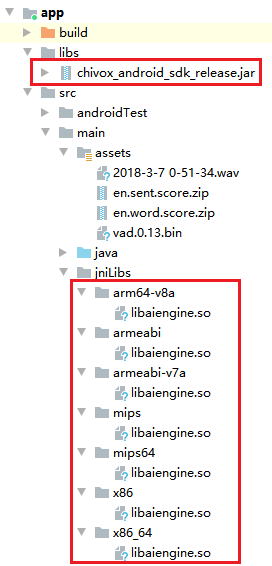
SDK Related permissions
<uses-permission android:name="android.permission.RECORD_AUDIO" />
<uses-permission android:name="android.permission.INTERNET" />
<uses-permission android:name="android.permission.READ_EXTERNAL_STORAGE" />
<uses-permission android:name="android.permission.WRITE_EXTERNAL_STORAGE" />
<uses-permission android:name="android.permission.ACCESS_WIFI_STATE" />
<uses-permission android:name="android.permission.READ_PHONE_STATE" />
Overall process
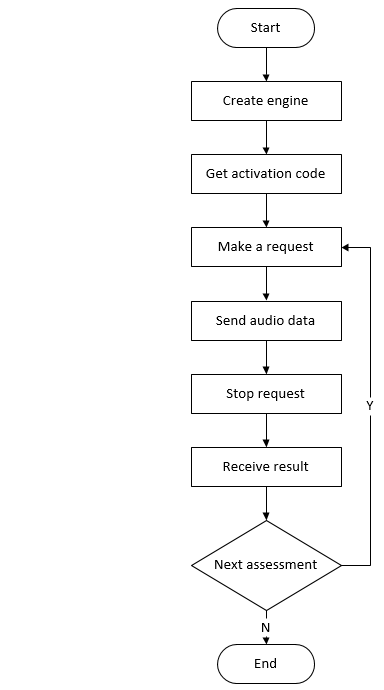
1. Get activation code
1.1 Function prototype
- static JSONObject getProvision(Context context, JSONObject input);
1.2 Function
- Get the activation code, the device needs to be connected to the Internet when calling (Please note that this operation will consume the license ). The activation code obtained by multiple calls to the same device and the same authorized account is the same, and it is only counted as a license.
- After calling this method for the first time, please save the activation code in the local file, which can be directly read from the local in the future, no need to get it again.
- If you need to get the activation code again for some reason, you need to delete the activation code file first and then call the getProvision method again.
1.3 Parameter inputJson description
| Name | Required | Description |
|---|---|---|
| appkey | true | Appkey authorized by Chivox |
| secretKey | true | The secretKey authorized by Chivox |
| userId | true | User ID |
1.4 Example of returned data
//Acquire the activation code for the first time successfully
{
	"serialNumber": "XXXX-XXXX-XXXX-XXXX-XXXX",
	"provision": "XXXXXXXXXX",
	"tips": "a new provision for userId XXXXXX"
}
//Not the first time to obtain the activation code successfully
{
	"serialNumber": "XXXX-XXXX-XXXX-XXXX-XXXX",
	"provision": "XXXXXXXXXX",
	"tips": "deviceId with your userId already exists"
}
//Failed to get activation code
{
	"error": "getaddrinfo fail"
}
1.5 Sample code
    JSONObject readDeviceObj = new JSONObject();

    try {
        readDeviceObj.put("deviceIDEnable", 1);   //Get device information
        readDeviceObj.put("enableGetAndroidID", 1); //Get AndroidId
        readDeviceObj.put("enableGetAndroidImei", 1);//Get IMEI
        readDeviceObj.put("enableGetAndroidBuildSerial ", 1);//Get BuildSerial

    } catch (JSONException e) {

        e.printStackTrace();

    }

    Engine.OPT.setGlobalCfg(getApplicationContext(),readDeviceObj);

    try {
        JSONObject input = new JSONObject();
        input.put("appKey", appKey);
        input.put("secretKey", secretKey);
        input.put("userId", userId);

        JSONObject output = Engine.getProvision(context ,input);

        Log.e(TAG, "remote output:" + output);

        if (output.has("error")) {
            String errone = output.getString("error");
            // 获取序列号失败
            Log.e("TAG", "getSerialNumberAndProvision fail,error:" + errone);
            Toast.makeText(context, errone, Toast.LENGTH_LONG).show();
            return;
        }
        if (output.has("sperror")) {
            String errtwo = output.getString("sperror");
            //Faild
            Log.e("TAG", "getSerialNumberAndProvision fail,sperror:" + errtwo);
            Toast.makeText(context, errtwo, Toast.LENGTH_LONG).show();
            return;
        }
        if (!output.has("serialNumber")) {
            //Faild
            Log.e("TAG", "getSerialNumber fail: response no serialNumber");
            return;
        }

        if (!output.has("provision")) {
            //Faild
            Log.e("TAG", "getProsion fail: response no serialNumber");
            return;
        }

        //Success, save the activation information locally
        String ret =  writeSerialNumberTmpFile(context, output.toString(), appKey);

        serialNumber = output.getString("serialNumber");

        Log.i(TAG, "get serialNumber:" + serialNumber);

        String provison = output.getString("provision");
        provisionLocal = provison;
        Log.i(TAG, "get Provision:" + provisionLocal);

    } catch (JSONException e) {
        // exception
        return;
    }
2. Create Engine
2.1 Method prototype
- static void create(Context context, JSONObject cfg, Engine.CreateCallback callback);
2.2 Function
- Create an engine instance, just create a global evaluation engine when the product starts or enter the evaluation module, and subsequent evaluations can reuse the engine. It is recommended to call this interface at the entrance of the program (such as the onCreate method of Application and Activity)
2.3 Parameters
| Parameter name | Description |
|---|---|
| context | android.content.Context object |
| cfg | Engine related configuration, JSON format, including appKey, secretKey, provision and other information.Please refer to the cfg parameter description below for details |
| callback | Result callback |
2.4 cfg Parameter Description
| Name | Type | Required | Description |
|---|---|---|---|
| appKey | string | true | Appkey authorized by Chivox |
| secretKey | string | true | The secretKey authorized by Chivox |
| provision | string | true | The content of the provision field in the activation code obtained in Get activation code. |
| native | object | true | Evaluation resource package path |
| - timeout | int | false | The timeout (in seconds) from stopping the request to receiving results |
| vad | object | false | Voice activity detection |
| - enable | int | false | Default 0。 1, Indicates that the voice activity detection function is turned on 。 0, Indicates that the voice activity detection function is turned off. |
| - res | string | false | Vad resource path |
| - sampleRate | int | false | Audio sampleRate,unit Hz |
| - strip | int | false | whether to cut off the leading and trailing blanks when transmitting the audio data to the upper layer, generally set to 0 |
| prof | object | false | Log function node |
| - enable | int | false | Defult 0。 1, enable log function。 0, disable log function It is recommended to enable it during debug and disable it after official release。 |
| - output | String | false | The log file save path |
2.5 Create Engine Sample Code
// The decompression operation will be performed the first time it is called. When it is called again, if the resources in the App package have not changed, no decompression will be performed.

// Call the following code to decompress offline resources when the App starts. The decompression will be performed the first time it is called, and if the resource does not change when it is called again, it will not be decompressed again.

                AssetManager assetMng = context.getAssets();
                File resRoot = new File(getAviFiletwo(context)); //Resource decompression target directory
                Log.e(TAG, "resRoot" + resRoot);

                String[] assetNames = {"en.word.score.zip", "en.sent.score.zip", "en.pred.score.zip"};
                String result = ResTool.extract(assetMng, assetNames, resRoot, new ResTool.ExtractHint() {
                    @Override
                    public void onProgress(float progress) {
                        // progress [0, 1]
                        Log.e("TAG", "progress+++++"+progress);
                    }
                });
                if (null!= result) {
                    // Unzip failed
                    Log.e("TAG", "progress fail+++++" + result);
                } else {
                    // Unzip sucess
                    Log.e("TAG", "progress  sucess+++++" + result);
                }
// Build configuration information, this configuration is consistent with the general SDK, please refer to the general SDK document
JSONObject cfg = new JSONObject();
try {
	cfg.put("appKey", appKey);         // set AppKey
	cfg.put("secretKey", secretKey);   // set SecretKey
	cfg.put("provision", provision);   //The content of the provision field in the activation code

    { // The vad function is to automatically stop recording when mute is detected, optional
        JSONObject vad = new JSONObject();
        vad.put("enable", 0); //Whether to enable the vad function, the default is 0. 1 means open, 0 means not open. 。
        vad.put("res", vadPath);//Set vad resource path
        vad.put("sampleRate", 16000);  //Audio sampleRate,unit Hz
        vad.put("strip", 0); //When transmitting the audio data to the upper layer, whether to cut off the leading and trailing blanks, generally set to 0 (to avoid miscutting)
        cfg.put("vad", vad);
    }
    { // prof module, optional
	JSONObject prof = new JSONObject();
    prof.put("enable", 1);
    prof.put("output", "/path/to/agn_prof.log"); //Generic SDK prof log path
    cfg.put("prof", prof);
    }
    { // native If you need to use offline evaluation, configure these
        JSONObject nat = ResTool.loadNativeCfgJson(resRoot, new String[]{"en.word.score", "en.sent.score", "en.pred.score"});
     // What loadNativeCfg should pay attention to is that it reads conf.xml, and then returns the configuration of offline resources
        cfg.put("native", nat); //offline
    }
} catch (JSONException e) {
    return;
}
Log.e(TAG, "cfg++++" + cfg);

});

//Create an engine. This call will not block the UI thread. After the creation is successful, it will be called back through Engine.CreateCallback
Engine.create(context, cfg, new Engine.CreateCallback() {
    @Override
    public void onSuccess(Engine engine) {
    // Created successfully, please save the engine object for subsequent evaluation
    aiengine = engine;
    Log.e(TAG, "aiengine++++" + aiengine);
    }
	@Override
    public void onFail(RetValue err) {
		// Creation failed, please check e.errId and e.error to analyze the reason.
		Log.e("TAG", "aiengine+fail" + err);
    }
});
3. Make a request
3.1 Method prototype
- RetValue start(Context context, AudioSrc audioSrc, StringBuilder tokenId, JSONObject param, EvalResultListener listener);
3.2 function
- Initiate an evaluation request. After the call, stop or cancel must be called accordingly to ensure that the occupied resources are released.
3.3 parameter
| Parameter name | Description |
|---|---|
| context | android.content.Context object |
| audioSrc | The source of audio data, only supports wav, mono,16bite,16Khz audio format. There are two sources of audio data1.SDK Built-in Recorder: AudioSrc.InnerRecorder; This method has integrated system recorder related operations in the SDK, which is suitable for real-time evaluation scenes. PS:To use this mode, you need to configure the recorder. Please refer to 3.6 Recorder Parameters for details. 2.External Recorder: AudioSrc.OuterFeed; In this way, you need to send audio data from outer recorder to the engine for scoring. If you want to score audio file or use your own audio recorder, please choose this one. |
| tokenId | A StringBuilder object with empty content 。 If the start call is successful, the ID of this evaluation will be written into the tokenId, which is consistent with the tokenId returned by the evaluation result |
| param | Evaluation request parameters, see the description of evaluation request parameters below for details |
| listener | Evaluation result monitoring object, specific reference 6.Receive the result |
3.4 Return value description
| Return value RetValue.errId | Description |
|---|---|
| 0 | Suceess |
| other | Failed |
3.5 Evaluation request parameter description
| Name | Type | Required | Description |
|---|---|---|---|
| param | object | ture | Evaluation content |
| - coreProvideType | string | ture | Set “native” |
| - serialNumber | string | ture | The content of the serialNumber field in the activation code obtained in Get activation code. |
| - soundIntensityEnable | int | flase | Whether to return the volume in real time, the default is 0, if set to 1, the volume is passed 6.Receive the result In the onSoundIntensity interface callback, the parameter is "sound_intensity", the value range is 0~100; |
| - vad | object | flase | Sound detection function |
| - - vadEnable | int | flase | Default 0。 1 Indicates that the VAD function is enabled for this evaluation 。 0 Indicates that the vad function is not enabled for this review 。 |
| - - refDuration | int | flase | Set the audio vad delay to take effect (unit: second), which is to block VAD within a few seconds of the first recording |
| - - speechLowSeek | int | flase | Sensitivity, the unit is 20ms, set to N, it means that 20*N milliseconds after the speech stops are judged to be the end |
| - app | object | flase | App related Information |
| - - userId | string | flase | End user identification It is recommended to fill in the userId according to the user account , Facilitate troubleshooting 。 |
| - audio | object | ture | Audio information |
| - - audioType | string | ture | Audio encoding format |
| - - channel | int | ture | Number of audio channels |
| - - sampleBytes | int | ture | Sampling bits of built-in recorder |
| - - sampleRate | int | ture | Sampling rate of built-in recorder |
| - request | object | ture | Evaluation request, different kernel request parameters are different, for details, please refer to Offline Kernel Document |
3.6 Recorder parameter description
| Name | Type | Required | Description |
|---|---|---|---|
| audioSrc | object | ture | Recording mode 。 1. AudioSrc.InnerRecorder(),Represents the built-in recording mode。See the sample code in 2.7.1 below for details ; 2. AudioSrc.OuterFeed(),Represents the external recording mode, the customer needs to implement a recorder or read the recorded audio file. See the sample code in 2.7.2 below for details ; |
| - recordParam.sampleBytes | int | ture | Internal recorder sampling bits |
| - recordParam.sampleRate | int | ture | Internal recorder sampling rate |
| - recordParam.saveFile | file | flase | The effective path to save the recording file, including the recording file name |
| - recordParam.duration | int | flase | Recording duration (unit: milliseconds) Different kernel recording time is different, for details, please refer to Offline Kernel Document |
3.7 Sample code
3.7.1 Built-in recording mode sample code
// Configure evaluation parameters
JSONObject param = new JSONObject();
try {
  param.put("coreProvideType", "native");
  param.put("serialNumber",serialNumber);
  { // If necessary, set the vad parameter
    JSONObject vad = new JSONObject();
    vad.put("vadEnable", 1);
    vad.put("refDuration", 10);
	vad.put("speechLowSeek", 50); //Sensitivity, the unit is 20ms, set to N, it means that 20*N milliseconds after the speech stops are judged to be the end
    param.put("vad", vad);
  }
  //param.put("soundIntensityEnable", 1);   //Whether to return the volume in real time, the value is 0,1, and the default is 0.1, which means the volume is returned in real time. 0, means no return 。
  { // Set app related information
    JSONObject app = new JSONObject();
    app.put("userId", "this-is-userid");    // Terminal user identification, it is recommended to fill in userId according to the user account to facilitate troubleshooting.
    param.put("app", app);
  }
  { // Set audio properties, built-in recording mode to support wav, 16bite, 1600 sampling rate this audio format
    JSONObject audio = new JSONObject();
    audio.put("audioType", "wav");
    audio.put("channel", 1);
    audio.put("sampleBytes", 2);
    audio.put("sampleRate", 16000);
    param.put("audio", audio);
  }
  { // Kernel request parameters
    JSONOjbect request = new JSONObject();
    request.put("coreType", "en.word.score");   //Evaluation kernel, English word kernel
    request.put("refText", "present");  //Evaluation text
    request.put("rank", 100);  //Scoring system
    param.put("request", request);
  }
} catch(JSONException e) {
  // exception
  return;
}

// Configure audio recorder options
AudioSrc.InnerRecorder innerRecorder = new AudioSrc.InnerRecorder();
innerRecorder.recordParam.sampleBytes = 2;
innerRecorder.recordParam.sampleRate = 16000;
innerRecorder.recordParam.saveFile = null;    // If you need to save the recording file, set a file
innerRecorder.recordParam.duration = 3000;    // If you need to stop recording automatically, you can set the recording time.

// Call start to start evaluation
StringBuilder tokenId = new StringBuilder(); // tokenId - Used to receive the evaluation task ID
RetValue ret = engine.start(context, innerRecorder, tokenId, param, new EvalResultListener() {
  @Override
  void onError(String tokenId, EvalResult result) {
    // Evaluation failed, please check result.errId, result.error to analyze the reason for the failure.
  }
  @Override
  void onEvalResult(String tokenId, EvalResult result) {
    // Return to the evaluation result
  }
  @Override
  void onBinResult(String tokenId, EvalResult result) {
    // Binary result, currently the audio synthesis core returns data through this interface
  }
  @Override
  void onVad(String tokenId, EvalResult result) {
    //Real-time vad results, returned when vad is enabled
  }
  @Override
  void onSoundIntensity(String tokenId, EvalResult result) {
    // Real-time sound intensity results, returned when soundIntensity is enabled
  }
  @Override
  void onOther(String tokenId, EvalResult result) {
    // Reserved expansion interface
  }
});
// Determine whether the start call is successful
if (0 != ret.errId)
{
  // Failed to call start, please check ret.errId, ret.error to analyze the reason
  return;
}
3.7.2 Sample code for external recording mode
// Configure evaluation parameters
JSONObject param = new JSONObject();
try {
  param.put("coreProvideType", "native");
  param.put("serialNumber",serialNumber);
  { // If necessary, set the vad parameter
    JSONObject vad = new JSONObject();
    vad.put("vadEnable", 0);
    vad.put("refDuration", 10);
    param.put("vad", vad);
  }
  { // Set app related information
    JSONObject app = new JSONObject();
    app.put("userId", "this-is-userid");    // Terminal user identification, it is recommended to use the user account to set this parameter to facilitate troubleshooting
    param.put("app", app);
  }
  { // Set the audio properties to match the actual audio
    JSONObject audio = new JSONObject();
    audio.put("audioType", "wav");
    audio.put("channel", 1);
    audio.put("sampleBytes", 2);
    audio.put("sampleRate", 16000);
    param.put("audio", audio);
  }
  { // Kernel request parameters
    JSONOjbect request = new JSONObject();
    request.put("coreType", "en.word.score");   //Evaluation kernel, English word kernel
    request.put("refText", "present");  //Evaluation text
    request.put("rank", 100);  //Scoring system
    param.put("request", request);
  }
} catch(JSONException e) {
  // exception
  return;
}

// Call start
StringBuilder tokenId = new StringBuilder();    // tokenId - Used to receive the evaluation task ID
RetValue ret = engine.start(context, new AudioSrc.OuterFeed(), tokenId, param, new EvalResultListener() {
  @Override
  void onError(String tokenId, EvalResult result) {
    //Evaluation failed, please check result.errId, result.error to analyze the reason for the failure.
    // When you enter here, please call the engine.cancel() interface to reset the engine, otherwise it will not start normally next time.
    engine.cancel();
  }
  @Override
  void onEvalResult(String tokenId, EvalResult result) {
    // Return to the evaluation result
  }
  @Override
  void onBinResult(String tokenId, EvalResult result) {
    // Binary result, currently the audio synthesis core returns data through this interface
  @Override
  void onVad(String tokenId, EvalResult result) {
    // Real-time vad results, returned when vad is enabled
  }
  @Override
  void onSoundIntensity(String tokenId, EvalResult result) {
    // Real-time sound intensity results, returned when soundIntensity is enabled
  }
  @Override
  void onOther(String tokenId, EvalResult result) {
    // Undefined result
  }
});
if (0 != ret.errId) {
  // Failed to call start, please check ret.errId, ret.error to analyze the reason
  return;
}

// Call feed to pass in audio, it may be adjusted many times
ret = engine.feed(data, len);
if (0 != ret.errId) {
  // Failed to call feed
  return;
}
4.Send audio data
4.1 Method prototype
- RetValue feed(byte[] data, int size);
4.2 Function
- The external recording mode needs to call this method to transfer the audio data, the internal recording mode does not need
4.3 Parameters
data: Audio data
size: Data length
4.4 Return value description
- RetValue.errId == 0 Indicates that the call was successful, otherwise the call failed
4.5 Calling code sample
RetValue ret = engine.feed(buffer, size);
if (0 != ret.errId) {
  // Calling feed fails, usually because the calling sequence is wrong. Please check ret.errId, ret.error to analyze the reason
  // It is recommended to call eval.cancel() here to cancel the evaluation
  return;
}
// Running to this point indicates that the feed is called successfully
5. Stop request
5.1 Method prototype
- RetValue stop();
5.2 Function
- When you need to end the incoming audio or end the recording, call this method. After calling this method, it will enter the state of waiting for the evaluation result.
Note: The stop() method must be the same as The start() method of make a request is called in pairs ,Otherwise, the next start() will report an error。If the recording duration is specified when using the built-in recording evaluation, then when the recording duration arrives, stop() will be automatically called inside the SDK, and the business layer does not need to call it. .
5.3 Return value description
- RetValue.errId == 0 means the call was successful, otherwise it means the call failed
5.4 Calling code sample
RetValue ret = aiengine.stop();
if (0 != ret.errId) {
// Failed to call stop, please check ret.errId, ret.error to analyze the reason
Log.i(TAG, "stop_errorid" + ret.errId);
return;
}
// Running to this point means that the call to stop is successful
6. Receive the result
6. Interface EvalResultListener
- Evaluation result monitoring interface The interface is in 3.Make a request through the listener parameter setting in the interface
//Evaluation abnormal
void onError(Eval eval, EvalResult result);
//Evaluation results
void onEvalResult(Eval eval, EvalResult result);
//Binary result
void onBinResult(Eval eval, EvalResult result);
//vad test results
void onVad(Eval eval, EvalResult result);
//Audio volume
void onSoundIntensity(Eval eval, EvalResult result);
//Reserved expansion interface
void onOther(String tokenId, EvalResult result);
6.2 class EvalResult
- Evaluation result class
Instance method
String tokenId(); The unique identification of this evaluation.
boolean isLast(); Is it the last result of this evaluation
String text(); When the result is received from the following interface of EvalResultListener, this method should be used to get the result data:
void onError(Eval eval, EvalResult result);
void onEvalResult(Eval eval, EvalResult result);
void onVad(Eval eval, EvalResult result);
void onSoundIntensity(Eval eval, EvalResult result);
- byte[] data(); When the result is received from the following interface of EvalResultListener, this method should be used to get the result data: ```` void onBinResult(Eval eval, EvalResult result);
- String recFilePath();
If the recording file is saved successfully, return the path of the recording file, otherwise return null.

#### 6.3 Return result code example  {docsify-ignore}
@Override
void onError(String tokenId, EvalResult result) {
//Evaluation failed, please check result.errId, result.error to analyze the reason for the failure.
}
@Override
void onEvalResult(String tokenId, EvalResult result) {
// Return to the evaluation result
Log.e(TAG, "recordEvalResult" + evalResult);
Log.e(TAG, "recordEvalResult.recFilePath:" + evalResult.recFilePath());
Log.e(TAG, "recordEvalResult.text:" + evalResult.text());
}
@Override
void onBinResult(String tokenId, EvalResult result) {
// Binary result, currently the audio synthesis core returns data through this interface
}
@Override
void onVad(String tokenId, EvalResult result) {
// Real-time vad results, returned when vad is enabled
// Example of returned result :{"vad_status": 0, "sound_intensity": 12.0}
//vad_status: Vad detection status, the value is 0,1,2, status description:
//0:vad starts to detect and is in silent state;
//1:vad detects the recording
//2:The vad detection is over, and the recording is muted again
}
@Override void onSoundIntensity(String tokenId, EvalResult result) { // Real-time sound intensity results, returned when soundIntensity is enabled } @Override void onOther(String tokenId, EvalResult result) { // Reserve expansion interface }
### 7.Cancel request
<br/>

#### 7.1 Method prototype  {docsify-ignore}
- void cancel();

#### 7.2 Function {docsify-ignore}
- After calling this method, the current evaluation request will be cancelled <br/>

<font color="red"> Note: If you call cancel after calling start, you can call stop without pairing. </font>

#### 7.3 Calling code sample  {docsify-ignore}
```java

// Cancel current review
aiengine.cancel();

```


### 8.Destroy the engine
<br/>

#### 8.1  Method prototype  {docsify-ignore}

- void destroy();
<br/>

#### 8.2 Function  {docsify-ignore}
- Destroy the engine and release resources. After the engine is destroyed, it cannot be used for evaluation again. <br/>

<font color="red"> Note: If you have never called this method, this method will be called automatically when the engine object is GC by the virtual machine. However, the timing of the engine object being GC cannot be guaranteed, so it is recommended to call destroy manually </font>

#### 8.3 Calling code sample  {docsify-ignore}
```java

// Destroy the engine
aiengine.destroy();

```


###  9. Playback audio

class AudioPlayer

Audio playback class
- **[Static method ]**
static AudioPlayer sharedInstance();
Role: Return the singleton object.
- **[Member method ]**
void play(String path, final Listener listener);
Role: Play audio.
- **Parameter**
path - Audio file path
listener - Listen for events
- **[Member method ]**
void cancel();
Role: cancel playback


<br/>

**Sample code for calling and playing audio:**
```java
player.play("path/to/file.wav", new AudioPlayer.Listener() {
  void onStarted(AudioPlayer ap) {
    // Start playing event
  }
  void onStopped(AudioPlayer ap) {
    // Stop playing event
  }
  void onError(AudioPlayer ap, String info) {
    // An error occurred
  }
});

```

### 10. Other interface

#### Get SDK version {docsify-ignore}

```java
String sdkVersion = SdkInfo.singleton().commonSdkVersion +"-" + SdkInfo.singleton().version;
       Log.e(TAG, "sdk version:" + sdkVersion);
```