/docs
Unity offline sdk
0.Integration to prepare
Authorized Account
- AppKey
- SecretKey
Supported operating environment
- Unity version 2017.4 and later
Supported platforms and architectures
| Platform | Architectures |
|---|---|
| Android | x86、armv7(armeabi-v7a)、arm64(arm64-v8a) |
| iOS | All CPU architectures, including emulators |
| Windows | x86(32bits)、x86_64(64bits) |
| Mac | x86_64 |
How to use the Unity SDK
- Build android apps directly with Unity.
- Build Windows applications directly with Unity.
- Build an iOS Xcode project using Unity, then build an iOS APP without making major changes to the project 。
Not supported by the Unity SDK
- Export the Android project using Unity and then build the Android APP with significant modifications.
- Export the iOS Xcode project using Unity, then build the iOS APP with significant modifications.
- use the Unity SDK in C# projects outside of Unity. 。
How to import SDK package in Unity projec
Here is how to import the SDK package in Unity 2018.4, as well as other versions of Unity:
- Open Unity and enter the project where you need to import the SDK package.
- Click "Assets" menu, and click "Custom Package..." in "Import Package". The project.
- Select the SDK package to be imported and click Open.
- In the list of files that pop up in Unity, click the "Import" button.
After completing the above steps, the Unity project will add several SDK directories and files to complete the import.
Description of directories and files in the SDK package
The following directories and files belong to the SDK are in the Assets directory:
The home directory of libaiengine
1.Android platform library file libaiengine.so directory
2.Directory for the ios platform library file libaiengine.a
3.Directory for the Windows platform library aiengine. DLL 4.Other files Source files for the classes and interfaces used by the Unity SDKPlugins Specifies the directory used by plug-ins specified by Unity
Android Unity specifies the directory used by Android plugins
AIEngine. Jar jar file
SDK file
| Versions | Updated date | Description |
|---|---|---|
| 2.3.7-2.0.7 | 2025.11.11 | Fix the issue with getting activation code abnormally |
Overall process
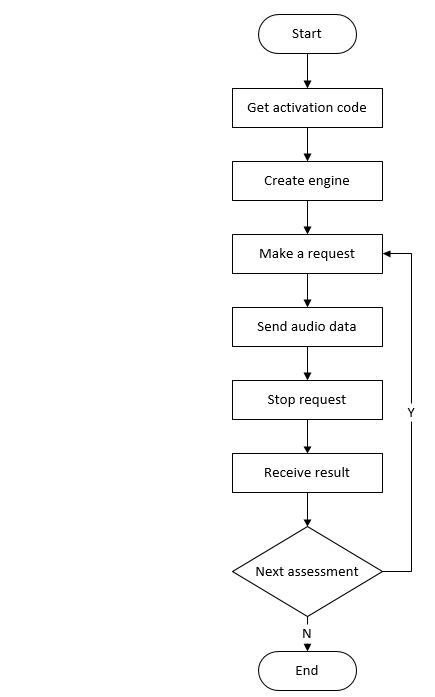
1.Get Activation Code
1.1 Function prototype
- public static JsonData GetProvision(JsonData inputJson);
1.2 Function
- Get the activation code, the device needs to be connected to the Internet when calling (Please note that this operation will consume the license ). The activation code obtained by multiple calls to the same device and the same authorized account is the same, and it is only counted as a license.
- After calling this method for the first time, please save the activation code in the local file, which can be directly read from the local in the future, no need to get it again.
- If you need to get the activation code again for some reason, you need to delete the activation code file first and then call the getProvision method again.
1.3 Parameter inputJson description
| Parameter | Required | Description |
|---|---|---|
| appkey | true | Chivox authorized AppKey. |
| secretKey | true | Chivox authorized secretKey. |
| userId | true | User ID |
1.4 Example of returned data
- getProvision
//Acquire the activation code for the first time successfully
{
	"serialNumber": "XXXX-XXXX-XXXX-XXXX-XXXX",
	"provision": "XXXXXXXXXX",
	"tips": "a new provision for userId XXXXXX"
}
//Not the first time to obtain the activation code successfully
{
	"serialNumber": "XXXX-XXXX-XXXX-XXXX-XXXX",
	"provision": "XXXXXXXXXX",
	"tips": "deviceId with your userId already exists"
}
//Failed to get activation code
{
	"error": "getaddrinfo fail"
}
1.5 Sample code
Note: In order to make the engine work normally, please add the following code to the Update function of the MonoBehaviour class
private void Update()
{
	try
	{
		Engine.StaticUnityUpdate();

		if (MEngine != null)
		{
			MEngine.UnityUpdate();
		}
	}
	catch (Exception e)
	{
		Debug.LogWarning("Update caught an exception");
		Debug.LogWarning(e.Message);
		Debug.LogWarning(e.StackTrace);
	}
}
```
Get activation code
JsonData snReq = new JsonData();
snReq["appKey"] = appKey;
snReq["secretKey"] = secretKey;
snReq["userId"] = userId;

//Get serialNumber and provision
JsonData snResult = Engine.GetProvision(snReq);

serialNumber = snResult["serialNumber"].ToString();
provision = snResult["provision"].ToString();
Debug.Log("serialNumber:"+ serialNumber);
Debug.Log("provision:" + provision);
### 2.Create engine


#### 2.1  Static function {docsify-ignore}

- public static void Create(JsonData cfg, CreateSuccessCallback successCallback, CreateFailCallback failCallback);

#### 2.2 Function {docsify-ignore}
- Create an engine instance, just create a global evaluation engine when the product starts or enter the evaluation module, and subsequent evaluations can reuse the engine. As long as the engine is not destroyed, it can be reused.

#### 2.3 Parameters {docsify-ignore}

|the name of the argument|description|
|:----    |----------   |
|cfg      |Create Engine configuration, In JSON format, refer to the cfg parameters below for details. |
|OnCreateSuccess    |Successful callback |
|OnCreateFail    |Failed callback  |


###### 2.4 Cfg Parameters  {docsify-ignore}
| Name  |  Type | Required| Description  |
| ------------ | ------------ | ------------ | -----|
|appKey | string | true|Chivox authorized AppKey. |
|secretKey | string | true|Chivox authorized secretKey. |
|provision | string | true|The content of the provision field in the activation code obtained in <a href="/en/docs/offline/sdkDoc/Unity-offline-sdk#_1get-activation-code">Get activation code</a>. |
|native | object |true |Offline scoring resources|
|vad | object | false |Voice Activity Detection module node|
|- enable | int | false |Default0.<br/>1:Load vad module.<br/>0:Not load vad module.|
|- res | string | false |Vad resource path|
|- sampleRate | int | false |Audio sampleRate,unit Hz|
|- strip | int | false |Whether to filter the silent frames in the beginning and end, default value is 1, recommend 0.|
|prof | object | false |Log function.|
|- enable | int | false |Default 0.<br/>1: enable log function<br/>0: disable log function<br/>It is recommended to enable it during debug and disable it after official release.|
|- output | String | false |Log file saved path.|


###### 2.5 Create engine sample code {docsify-ignore}
```C#

            MVadPath = AIEngineUtility.CopyStreamingAssets("vad.0.13.bin");
			MLogPath = Path.Combine(Application.persistentDataPath, "log.txt");
			MRocordPath = Path.Combine(Application.persistentDataPath, "1.wav");


            string[] resStrs = { "en.word.score.zip", "en.sent.score.zip", "en.pred.exam.zip", "en.sent.rec.zip" };
            String result = ResTool.Extract(resStrs, Application.streamingAssetsPath,new MyExtractHint());

            Engine.SetLogFile(MLogPath);

			Debug.Log("rocordPath: " + MRocordPath);
			Debug.Log("OnButtonInit succeed");

			JsonData cfg = new JsonData();
			cfg["appKey"] = appKey;
			cfg["secretKey"] = secretKey;
			cfg["provision"] = provision;


			cfg["vad"] = new JsonData();
			cfg["vad"]["enable"] = 1;
            cfg["vad"]["res"] = MVadPath;

            string[] resString = { "en.word.score", "en.sent.score", "en.pred.exam", "en.sent.rec"};
            JsonData resJson =  ResTool.LoadNativeCfgJson(Application.streamingAssetsPath,resString);
            cfg["native"] = resJson;
            Debug.Log(resJson.ToJson());
            Engine.Create(cfg, OnCreateSuccess, OnCreateFail);

			Debug.Log("cfg: " + cfg.ToJson());
3.Make a request
3.1 Function Prototype
- public RetValue Start(AudioSrc audioSrc, out string tokenID, JsonData param, IEvalResultListener listener);
3.2 Function
- start the assessment. after the start is called, top orancel must be called accordingly to ensure that the occupied resources are released.
3.3 Parameter
| Parameter name | Description |
|---|---|
| audioSrc | The source of audio data, only supports wav, mono, 16bite, 16Khz audio format, There are two sources of audio data 1.Built-in Recording Mode ChivoxAIInnerRecorder; This method has integrated system recorder related operations in the SDK, which is suitable for real-time evaluation scenes Note:To use this mode, you need to configure the recorder. Please refer to 3.6 Recorder Parameters for details. 2.External Recording Mode ChivoxAIOuterFeed; In this way, you need to send audio data from outer recorder to the engine for scoring. If you want to score audio file or use your own audio recorder, please choose this one. |
| tokenId | If the start call is successful, the tokenId will be written into the ID of this evaluation, which is consistent with the tokenId returned by the evaluation result. |
| param | For details, please refer to 3.5 Evaluation Request Parameters for details. |
| listener | Evaluation result listener, for details, please refer to 6. Receive Result. |
3.4 Return value description
| Returns the value RetValue.errId | Description |
|---|---|
| 0 | Succeed |
| other | Fail |
3.5 Evaluation Request Parameters
| Name | Type | Required | Description |
|---|---|---|---|
| param | object | true | Evaluation content |
| - coreProvideType | string | true | Set "native" |
| - serialNumber | string | ture | The content of the serialNumber field in the activation code obtained in Get activation code. |
| - soundIntensityEnable | int | false | Whether to return the volume in real time. The default value is 0. If 1 is set, the volume will pass Receiving resultCall back the onsoundintensity interface in. The parameter is "sound_intensity", the value range is 0 ~ 100; |
| - vad | object | false | Voice Activity Detection |
| - - vadEnable | int | false | Default 0 1:Enable VAD. 0:Disable VAD. |
| - - refDuration | int | false | Default 0 Set how long will the vad be disbaled after recording starts (unit: seconds) |
| - - speechLowSeek | int | false | Silence sensitivity, 20ms per frame, set N means after N*20ms of silent audio, it would return 2(time to stop engine) |
| - app | object | false | App related information |
| - - userId | string | false | User identification.It is recommended to fill in with real user account, Facilitate troubleshooting. |
| - audio | object | true | Audio information |
| - - audioType | string | true | Audio coding format |
| - - channel | int | true | Number of audio recording channels |
| - - sampleBytes | int | true | Audio sampling bits |
| - - sampleRate | int | true | Audio sampling rate |
| - request | object | true | Evaluation request, different cores have different parameters, for details, please refer to Offline Kernel Document |
3.6 Recorder Parameters Description
| Name | Type | Required | Description |
|---|---|---|---|
| audioSrc | object | true | Recording mode. 1. AudioSrc.InnerRecorder, which stands for built-in recording mode. See the sample code for 3.7.1 below; 2. New AudioSrc.OuterFeed, which represents an external recording mode, requires the customer to implement the recorder himself or read the recorded audio file. See the sample code for 3.7.2 below; |
| - recordParam.Duration | int | true | recording time, (in milliseconds) different kernel recording time is different, for details, please refer to Offline Kernel Document |
| - recordParam.saveFile | string | true | the path to save the recording file, including the recording file name. null,on behalf of not saving the recording file. |
3.7 Code sample
3.7.1 Built-in Recording Mode Sample Code
	JsonData param = new JsonData();
    param["coreProvideType"] = "native";
    //Fill in the serial number
    param["serialNumber"] = serialNumber;
    param["app"] = new JsonData();

	param["app"]["userId"] = "this-is-user-id";
	param["audio"] = new JsonData();
	param["audio"]["audioType"] = "wav";
	param["audio"]["channel"] = 1;
	param["audio"]["sampleBytes"] = 2;
	param["audio"]["sampleRate"] = 16000;
	param["request"] = new JsonData();
	param["request"]["coreType"] = "en.sent.score";
	param["request"]["refText"] = "I know the place very well.";

	string tokenID;
	AudioSrc.InnerRecorder audioSrc = new AudioSrc.InnerRecorder
	{
		recordParam = new ChivoxMedia.RecordParam
		{
			Duration = 5500,
			SaveFile = MRocordPath
		}
	};

	MEngine.Start(audioSrc, out tokenID, param, MListener);
	Debug.Log("param: " + param.ToJson());
	Debug.Log("tokenID: " + tokenID);
	Debug.Log("OnButtonRecordStart succeed");
3.7.2 External recorder Sample Code
	JsonData param = new JsonData();
	param["coreProvideType"] = "native";
	/Fill in the serial number
    param["serialNumber"] = serialNumber;
	param["app"] = new JsonData();
	param["app"]["userId"] = "this-is-user-id";
	param["audio"] = new JsonData();
	param["audio"]["audioType"] = "wav";
	param["audio"]["channel"] = 1;
	param["audio"]["sampleBytes"] = 2;
	param["audio"]["sampleRate"] = 16000;
	param["request"] = new JsonData();
	param["request"]["coreType"] = "en.sent.score";
	param["request"]["refText"] = "I know the place very well.";

	string tokenID;
	MEngine.Start(new AudioSrc.OuterFeed(), out tokenID, param, MListener);
	FileStream file = new FileStream(MWavPath, FileMode.Open, FileAccess.Read);
	file.Seek(44, SeekOrigin.Begin);
	byte[] buf = new byte[3200];
	int bytes;
	while ((bytes = file.Read(buf, 0, 3200)) > 0)
		{
			//Incoming audio clip
			MEngine.Feed(buf, bytes);
		}
	file.Close();
4.Send audio data
4.1 Function Prototype
- public RetValue Feed(byte[] data, int length);
4.2 Function
- Using the external recording mode requires calling this method to pass in audio data, and the internal recording mode is not required
4.3 Parameter
bytes: voice data
length: data length
4.4 the return value of the
- RetValue.errId s 0 indicates that the call was successful, otherwise the call failed.
Sample Code:
    FileStream file = new FileStream(MWavPath, FileMode.Open, FileAccess.Read);
        file.Seek(44, SeekOrigin.Begin);
        byte[] buf = new byte[3200];
        int bytes;
        while ((bytes = file.Read(buf, 0, 3200)) > 0)
        {
            //Incoming audio clip
            MEngine.Feed(buf, bytes);
        }
        file.Close();
5.Stop request
5.1 Function Prototype
- public RetValue Stop();
5.2 Function
- Call this method when you need to end incoming audio or end recording. After this method is called, it enters the state of waiting for the evaluation results.。
Note: The stop method must be called in pairs with the start method of3.Make a request or the next time the start will report an error. If you specify the duration of the recording when using the built-in recording evaluation, the top is automatically called within the SDK when the recording duration arrives, and the business layer does not need to call.
5.3 return value description
- RetValue.errId s 0 indicates that the call was successful, otherwise the call failed.
5.4 call a code sample
MEngine.Stop();
6.Receive Result
6.1 Receiving Result Interface:
public interface IEvalResultListener;
- The evaluation results listening interface. the interface is set in the3.Make a requestinterface through the listener parameter
    //evaluating error
    void OnError(string tokenID, EvalResult result);
    //evaluating result
    void OnEvalResult(string tokenID, EvalResult result);
    //binary result
    void OnBinResult(string tokenID, EvalResult result);
    //audio volume
    void OnSoundIntensity(string tokenID, EvalResult result);
    //reserved expansion interface
    void OnOther(string tokenID, EvalResult result);
6.2 Return Result Code Example
public class AIEngineTestEvalResultListener : IEvalResultListener
{
    private static void PrintResult(string tokenID, EvalResult result)
    {
        try
        {
            if (result.RecFilePath != null)
            {
                AIEngineTest.MInstance.MAudioPath = result.RecFilePath;
            }
            Debug.Log("On Result");
            Debug.Log("tokenID: " + tokenID);
            Debug.Log("tokenID: " + result.TokenID);
            Debug.Log("result: " + result.Text);
            Debug.Log("path: " + result.RecFilePath);
        }
        catch (Exception e)
        {
            Debug.LogWarning("PrintResult caught an exception");
            Debug.LogWarning(e.Message);
            Debug.LogWarning(e.StackTrace);
        }
    }
//evaluating error
    public void OnError(string tokenID, EvalResult result)
    {
        PrintResult(tokenID, result);
    }
//evaluating result
    public void OnEvalResult(string tokenID, EvalResult result)
    {
        PrintResult(tokenID, result);
    }
//binary result
    public void OnBinResult(string tokenID, EvalResult result)
    {
        PrintResult(tokenID, result);
    }
//audio volume
    public void OnSoundIntensity(string tokenID, EvalResult result)
    {
        PrintResult(tokenID, result);
    }
//reserved expansion interface
    public void OnOther(string tokenID, EvalResult result)
    {
        PrintResult(tokenID, result);
    }
}
7.Cancel Request
7.1 Function Prototype
- public RetValue Cancel();
7.2 Function
- after this method is called, the current evaluation request is canceled.
Note: if you call cancel() after calling start(), you do not need to call Stop().
7.3 Code Sample
// cancel the evaluation
MEngine.Cancel();
8.Playback Audio
8.1 Function
public class AudioPlayer;
- [Static method ] SharedInstancepublic static AudioPlayer SharedInstance(); Function:Returns a single-case object.
- [Member Method ] SetAudioSourcevoid play(String path, final Listener listener);Function:Play audio.
Parameter audioSource:The Unity object to play audio - [Member Method ] PlayOneShotFunction:Play audio
Parameter path:Audio file path - [Member Method ] Cancelpublic void Cancel();Function: Cancel playback.
8.2 Playback Audio Code Sample
    ChivoxMedia.AudioPlayer.SharedInstance().MAudioSource = GetComponent<AudioSource>();
    ChivoxMedia.AudioPlayer.SharedInstance().PlayOneShot(MAudioPath);
9.Destroy engine
9.1 Function Prototype
- public void Destroy();
9.2 Function
- Destroy the engine and release resources. After the engine is destroyed, it can't be used for evaluation again.
Note: Destroy is actively called when the evaluation engine is no longer needed. Even if you do not actively call this method, the SDK will automatically call this method internally when the engine object is being machined by the virtual machine GC, but the timing of the GC cannot be guaranteed.
9.3 Code sample
// destroy the engine
MEngine = null;
10. Other interface
Get SDK version
		SDKInfo sdkinfo = Engine.SDKInfo;

		string sdkVersion = sdkinfo.CommonSDKVersion + "-" + sdkinfo.Version;

		Debug.Log("sdkVersion:"+ sdkVersion);