
/docs
pubspec.yaml
0.Integration preparation
Supported platforms
- Android API Level >=14 (Android 4.0 above)
- iOS 6.0 and above
Authorized account
- AppKey and SecretKey
- Developer certificate aiengine.provision
Import SDK
- Local Import Flutter SDK download
# pubspec.yaml
  dependencies:
    chivox_aiengine:
        path: ***    # Flutter sdk path
Overall process
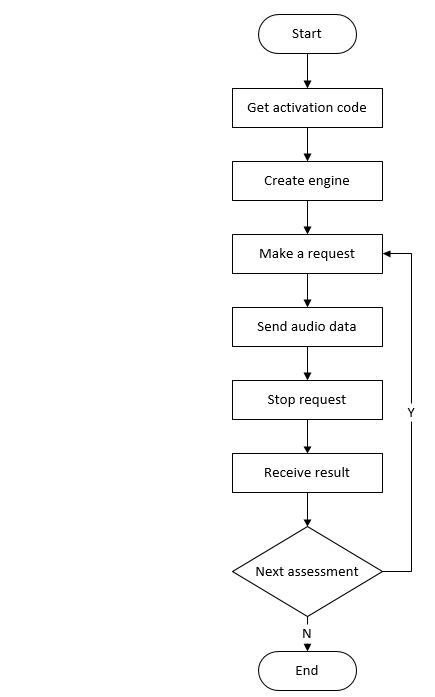
1.Get activation code
1.1 Function prototype
static Future<String?> getProvision(ChivoxAiengine? engine, Map input)
1.2 Function
- Get the activation code, the device needs to be connected to the Internet when calling (Please note that this operation will consume the license ). The activation code obtained by multiple calls to the same device and the same authorized account is the same, and it is only counted as a license.
- After calling this method for the first time, please save the activation code in the local file, which can be directly read from the local in the future, no need to get it again.
- If you need to get the activation code again for some reason, you need to delete the activation code file first and then call the getProvision method again.
1.3 Parameter input description
| Name | Required | Description |
|---|---|---|
| appkey | true | Appkey authorized by Chivox |
| secretKey | true | The secretKey authorized by Chivox |
| userId | true | User ID |
1.4 Example of returned data
//Acquire the activation code for the first time successfully
{
	"serialNumber": "XXXX-XXXX-XXXX-XXXX-XXXX",
	"provision": "XXXXXXXXXX",
	"tips": "a new provision for userId XXXXXX"
}
//Not the first time to obtain the activation code successfully
{
	"serialNumber": "XXXX-XXXX-XXXX-XXXX-XXXX",
	"provision": "XXXXXXXXXX",
	"tips": "deviceId with your userId already exists"
}
//Failed to get activation code
{
	"error": "getaddrinfo fail"
}
1.5 Sample code
    String? output;
    final input = {
      "appKey": appKey,
      "secretKey": secretKey,
    };
    try {
      output = await ChivoxAiengine.getProvision(_engine, input);
    } on PlatformException catch (e) {
      print(e.code);
      print(e.message);
    }
2.Create Engine
2.1 Function Prototype
- static Future
create(String cfg)
2.2 Function
- Create an engine instance, create a global evaluation engine when the app initials or when needed, and reuse the engine for subsequent evaluation.
- It is recommended that this interface be called at the program entry point, such as the Application, Activity's onCreate method.
2.3 Parameters
| Parameter name | Description |
|---|---|
| cfg | Engine related configuration, JSON format, including appKey, secretKey, provision and other information.Please refer to the cfg parameter description below for details |
2.4 cfg Parameter Description
| Name | Type | Required | Description |
|---|---|---|---|
| appKey | string | true | Appkey authorized by Chivox |
| secretKey | string | true | The secretKey authorized by Chivox |
| provision | string | true | The content of the provision field in the activation code obtained in Get activation code. |
| native | object | true | Evaluation resource package path |
| - timeout | int | false | The timeout (in seconds) from stopping the request to receiving results |
| vad | object | false | Voice activity detection |
| - enable | int | false | Default 0。 1, Indicates that the voice activity detection function is turned on 。 0, Indicates that the voice activity detection function is turned off. |
| - res | string | false | Vad resource path |
| - sampleRate | int | false | Audio sampleRate,unit Hz |
| - strip | int | false | whether to cut off the leading and trailing blanks when transmitting the audio data to the upper layer, generally set to 0 |
| prof | object | false | Log function node |
| - enable | int | false | Defult 0。 1, enable log function。 0, disable log function It is recommended to enable it during debug and disable it after official release。 |
| - output | String | false | The log file save path |
2.5 Create Engine Sample Code
    try {
      await ChivoxAiengine.extractRes(
          "assets",
          [
            "vad.0.13.bin",
            "en.word.score.zip",
            "en.sent.score.zip",
          ],
          targetRoot, (double progress) {
        print(progress);
      });
    } on PlatformException catch (e) {
      print(e.code);
      print(e.message);
      return;
    }
    print("======== extractRes ret");

    //
    String? natStr;
    try {
      natStr = await ChivoxAiengine.loadNativeCfg(
          targetRoot, ["en.word.score", "en.sent.score"]);
    } on PlatformException catch (e) {
      print(e.code);
      print(e.message);
      return;
    }
    print("======== loadNativeCfg ret: $natStr");

    // test create
    Map? nat;
    if (natStr != null) {
      nat = json.decode(natStr);
    }
    Map cfg = {
      "appKey": appKey,
      "secretKey": secretKey,
      "provision": provisionB64,
      "native": nat
    };
    try {
      _engine = await ChivoxAiengine.create(json.encode(cfg));
    } on PlatformException catch (e) {
      print(e.code);
      print(e.message);
      return;
    }
3. Request
3.1 Function Prototype
- Future
start(Map<String, dynamic> audioSrc, String param, ChivoxAiengineResultListener listener)
3.2 Function
- Initiate an evaluation request. After the call, stop or cancel must be called accordingly to ensure that the occupied resources are released.
3.3 parameter
| Parameter name | Description |
|---|---|
| audioSrc | The source of audio data, only supports wav, mono,16bite,16Khz audio format. There are two sources of audio data1.SDK Built-in Recorder: AudioSrc.InnerRecorder; This method has integrated system recorder related operations in the SDK, which is suitable for real-time evaluation scenes. PS:To use this mode, you need to configure the recorder. Please refer to 3.6 Recorder Parameters for details. 2.External Recorder: AudioSrc.OuterFeed; In this way, you need to send audio data from outer recorder to the engine for scoring. If you want to score audio file or use your own audio recorder, please choose this one. |
| param | Evaluation request parameters, see the description of evaluation request parameters below for details |
| listener | Evaluation result monitoring object, specific reference 5.Receive the result |
3.4 Evaluation request parameter description
| Name | Type | Required | Description |
|---|---|---|---|
| param | object | ture | Evaluation content |
| - coreProvideType | string | ture | Set “native” |
| - serialNumber | string | ture | The content of the serialNumber field in the activation code obtained in Get activation code. |
| - soundIntensityEnable | int | flase | Whether to return the volume in real time, the default is 0, if set to 1, the volume is passed 6.Receive the result In the onSoundIntensity interface callback, the parameter is "sound_intensity", the value range is 0~100; |
| - vad | object | flase | Sound detection function |
| - - vadEnable | int | flase | Default 0。 1 Indicates that the VAD function is enabled for this evaluation 。 0 Indicates that the vad function is not enabled for this review 。 |
| - - refDuration | int | flase | Set the audio vad delay to take effect (unit: second), which is to block VAD within a few seconds of the first recording |
| - - speechLowSeek | int | flase | Sensitivity, the unit is 20ms, set to N, it means that 20*N milliseconds after the speech stops are judged to be the end |
| - app | object | flase | App related Information |
| - - userId | string | flase | End user identification It is recommended to fill in the userId according to the user account , Facilitate troubleshooting 。 |
| - audio | object | ture | Audio information |
| - - audioType | string | ture | Audio encoding format |
| - - channel | int | ture | Number of audio channels |
| - - sampleBytes | int | ture | Sampling bits of built-in recorder |
| - - sampleRate | int | ture | Sampling rate of built-in recorder |
| - request | object | ture | Evaluation request, different kernel request parameters are different, for details, please refer to Offline Kernel Document |
3.5 Recorder parameter description
| Name | Type | Required | Description |
|---|---|---|---|
| audioSrc | object | ture | Recording mode 。 1. AudioSrc.InnerRecorder(),Represents the built-in recording mode。See the sample code in 2.7.1 below for details ; 2. AudioSrc.OuterFeed(),Represents the external recording mode, the customer needs to implement a recorder or read the recorded audio file. See the sample code in 2.7.2 below for details ; |
| - recordParam.sampleBytes | int | ture | Internal recorder sampling bits |
| - recordParam.sampleRate | int | ture | Internal recorder sampling rate |
| - recordParam.saveFile | file | flase | The effective path to save the recording file, including the recording file name |
| - recordParam.duration | int | flase | Recording duration (unit: milliseconds) Different kernel recording time is different, for details, please refer to Offline Kernel Document |
3.6 Sample code
Built-in recording mode sample code
    var audioSrc = {
      "srcType": "innerRecorder",
      "innerRecorderParam": {
        "duration": 20000,
        "channel": 1,
        "sampleBytes": 2,
        "sampleRate": 16000,
      },
    };
    var param = '''{
      "soundIntensityEnable": 0,
      "coreProvideType": "native",
	  "serialNumber": serialNumberFinal,
      "vad": {
        "vadEnable": 0,
        "refDuration": 2,
        "speechLowSeek": 50
      },
      "audio": {
        "audioType": "wav",
        "sampleRate": 16000,
        "sampleBytes": 2,
        "channel": 1
      },
      "request": {
        "rank": 100,
        "refText": "I want to know the past and present of Hong Kong.",
        "coreType": "en.sent.score",
        "attachAudioUrl": 1
      }
}''';

    try {
      await _engine!.start(
          audioSrc,
          param,
          ChivoxAiengineResultListener(
              onEvalResult: (ChivoxAiengineResult result) {
            print(result.tokenId);
            print(result.text);
          }, onBinaryResult: (result) {
            // code
          }, onError: (result) {
            // code
          }, onVad: (result) {
            // code
          }, onSoundIntensity: (result) {
            // code
          }, onOther: (result) {
            // code
          }));
    } on PlatformException catch (e) {
      print(e.code);
      print(e.message);
      return;
    }
4. Send Audio Data
4.1 Function Prototype
- Future
feed(Uint8List bytes, int length)
4.2 Function
- The Built-in recorder mode needs to call this function to send audio data.
4.3 Parameters
bytes: Audio data
length: Data length
4.4 Sample code
    try {
      await _engine!.feed(Uint8List(4096), 4096);
    } on PlatformException catch (e) {
      print(e.code);
      print(e.message);
      return;
    }
5. Stop Request
5.1 Function Prototype
- Future
stop()
5.2 Function
- End the current evaluation request, After calling, it will enter the stage of waiting for evaluation results.
Note: The stop() method must be called in pairs with the start() method that sends the request, otherwise the next start() will report an error. If the recording duration is specified when using the built-in recorder , stop() will be automatically called in the SDK when the recording duration reaches, and you may not need to call manually.
5.3 Sample code
        try {
          await _engine!.stop();
        } on PlatformException catch (e) {
          print(e.code);
          print(e.message);
          return;
        }
6.Receiving results
6.1 ChivoxAiengineResultListener
- It is set in the request listener parameter settings:2.Request
  //Evaluation results
  void Function(ChivoxAiengineResult result) onEvalResult = (result) {};

  //Abnormal evaluation
  void Function(ChivoxAiengineResult result) onError = (result) {};

  //VAD test results
  void Function(ChivoxAiengineResult result) onVad = (result) {};

  //audio volume
  void Function(ChivoxAiengineResult result) onSoundIntensity = (result) {};

  //Reserved expansion interface
  void Function(ChivoxAiengineResult result) onOther = (result) {};
7. Cancel Request
7.1 Function Prototype
- Future
cancel()
7.2 Function
- Cancel the current evaluation request.
Note:if you call cancel() after calling start(), you do not need to call Stop().
7.3 Sample code
    try {
      await _engine!.cancel();
    } on PlatformException catch (e) {
      print(e.code);
      print(e.message);
      return;
    }
8. Destroy Engine
8.1 Function Prototype
- Future
destroy()
8.2 Function
- Destroy engine and Release resources. After the engine is destroyed, it can't be used for evaluation again.
Note: You need to call destroy manually
8.3 Sample Code
    try {
      await _engine!.destroy();
    } on PlatformException catch (e) {
      print(e.code);
      print(e.message);
      return;
    }