
/docs
Java offline sdk
0.Integration preparation
Supported operating environment
Hardware Configuration CPU:Dual-core 2.0GHz Memory: 2G RAM Hard Drive: The remaining space on the installation disk is greater than 2G
Software configuration Supports Windows 7 and above Linux (glibc minimum version 2.12) Mac
Authorized account
- AppKey
- SecretKey
Sdk files
- Interface file:AIEngine.java
- Library fileaiengine.dll (for Windows) libaiengine.so (for linux) libaiengine.dylib( for Mac)
Integrate SDK in the project
- Copy
aiengine.dll(libaiengine.soorlibaiengine.dylib) under the SDK folder to the syspath directory of the Java project (e.g., the root of the project);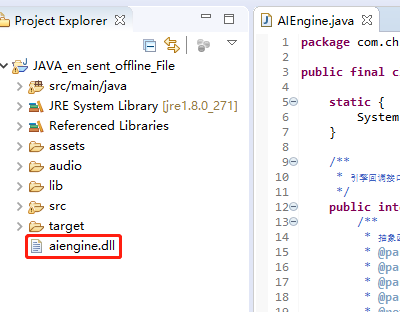
Overall process
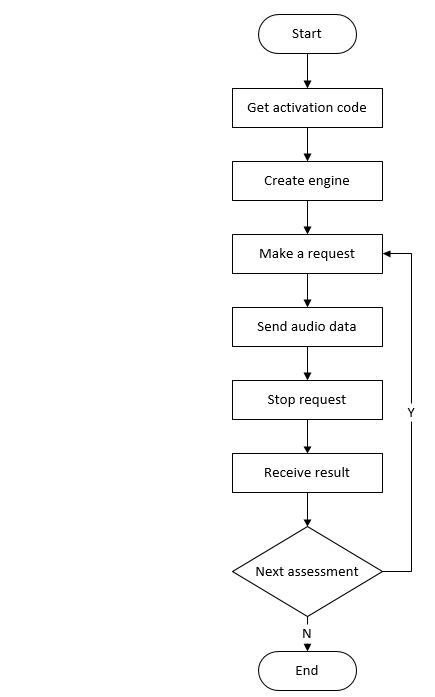
1. Get the activation code
1.1 Function prototype
- public static native int aiengine_opt(long engine, int opt, byte[] data, int size);
1.2 Function
Extend the operation, get the activation code, and when the function is called, the device needs to be networked(note that this will consume the license)
The resulting activation code (the number of the serialNumber field in the data is returned below) It is recommended to save to the local, and then when the evaluation module is started, it can be read directly and used without having to network each time to get the activation code.
The same device with the same account is activated multiple times, the activation code obtained is the same, only counted as a licence.
The acquired activation code is passed in to the engine in the make a request interface
1.3 Parameter inputJson description
| Return value | Option | Description |
|---|---|---|
| Appkey | Required | Chivox authorized AppKey |
| SecretKey | Required | Chivox authorized SecretKey |
| UserId | Required | User Id |
1.4 Returns value sample
- aiengine_opt
//Acquire the activation code for the first time successfully
{
	"serialNumber": "XXXX-XXXX-XXXX-XXXX-XXXX",
	"provision": "XXXXXXXXXX",
	"tips": "a new provision for userId XXXXXX"
}
//Not the first time to obtain the activation code successfully
{
	"serialNumber": "XXXX-XXXX-XXXX-XXXX-XXXX",
	"provision": "XXXXXXXXXX",
	"tips": "deviceId with your userId already exists"
}
//Failed to get activation code
{
	"error": "getaddrinfo fail"
}
1.5 Return value description
| Return value | Description |
|---|---|
| The size of the data | Getting the activation code success |
| Sperror/error | Failed to get the activation code |
1.6 Code sample
	//get activation code
	String userId = "this-is-userId";
	String sig = String.format("{\"appKey\":\"%s\",\"secretKey\":\"%s\",\"userId\":\"%s\"}", appKey,secretKey,userId);
	String ActivationInfo;
	JSONObject sig_json = null;
	try {
		sig_json = new JSONObject(sig);
		}
	catch (JSONException e) {
		// TODO Auto-generated catch block
		e.printStackTrace();
	}
	byte cfg_b[] = Arrays.copyOf(sig_json.toString().getBytes(), 1024);
	int ret = AIEngine.aiengine_opt(0, 6, cfg_b, 1024);
	ActivationInfo = new String(cfg_b);
	System.out.println("ActivationInfo: " + ActivationInfo);
2.Create an engine
2.1 Function prototype
- public static native long aiengine_new(String cfg, Object Context);
2.2 Function
- Create an instance of the engine, create a global evaluation engine when the product starts or enters the evaluation module, and subsequent evaluations can reuse the engine.
2.3 Parameter description
| Argument | Description |
|---|---|
| Cfg | Engine-related configuration, JSON format, should include appKey, secretKey, provision and other information. |
Description of the cfg parameters
| Name | Type | optional | Description |
|---|---|---|---|
| appKey | string | required | Chivox authorized appkey |
| secretKey | string | required | Chivox authorized secretKey |
| provision | string | required | The content of the provision field in the activation code obtained in Get activation code. |
| native | object | required | Score resources and paths offline |
| - timeout | int | false | The timeout (in seconds) from stopping the request to receiving results |
| vad | object | optional | Voice activity detection |
| - enable | int | optional | The default is 0. 1, indicates that voice activity detection is turned on. 0, which means that voice activity detection is turned off. |
| - res | string | optional | Vad resource path |
| - sampleRate | int | optional | Audio sample rate in Hz |
| - strip | int | optional | When passing audio data to the upper layer, whether to cut off the first and last blanks, generally set to 0 (avoid miseversaling) |
| prof | object | optional | Log functionality |
| - profEnable | int | optional | The default is 0. 1, indicates that the log function is turned on. 0, indicates that the log function can be turned on when the debug is turned off, and the feature can be turned off when it is online. |
| - profOutput | String | optional | The log file save path |
2.4 Cfg example
 {
    "appKey": "your appKey",         //Required
    "secretKey": "your secretKey",   //Required
    "provision": "XXXXXXXXXX",       //Required
	"vad":{
		"enable":0,
		"res":"assets/vad.bin",
		"sampleRate":16000,
		"strip":0
	}
    "native": {
       "en.word.score": {
			"res": "assets/resource/bin/eng.wrd"
		},
		"en.sent.score": {
			"res": "assets/resource/bin/eng.snt"
		},
		"en.pred.score": {
			"res": "assets/resource/exam/bin/eng.pred"
		}
    },
    "prof": {                           //Debug function, optional
        "enable": 0,                    //Debugging switch, disabled by default. Generally open during development and debugging stage, it is recommended to close before the product goes online
        "output": "log-file-path"       //If the debugging function is enabled, it must be selected, the debug log path, after configuration, the log information will be output to this directory
    }
}
2.5 Return value description
| Return value | Description |
|---|---|
| The instance pointer | Succeed |
| NULL | Failed, at which point the parameters should be checked |
2.6 Sample code
 /*Create engine instance*/
	String newCfg = "{\"prof\":{\"enable\":1, \"output\":\"assets/log.log\"},"
		+ "\"appKey\": \"" + appKey + "\", \"secretKey\": \"" + secretKey
		+ "\", \"provision\": \"assets/aiengine.provision\", "
		+ "\"native\":{\"en.word.score\":{\"res\":\"assets/resource/bin/eng.wrd.g4.P2.N1.0.3\"},"
		+ "\"en.sent.score\":{\"res\":\"assets/resource/bin/eng.snt.g4.P2.N1.0.4\"},"
		+ "\"en.pred.exam\":{\"res\":\"assets/resource/exam/bin/eng.pred.aux.P2.V5.4\"}},"
		+ "\"prof\":{\"enable\":1,\"output\":\"assets/log.log\"}}";

	System.out.println("newCfg: " + newCfg);
	engine = AIEngine.aiengine_new(newCfg, null);
	if (engine == 0)
    {
        System.out.println("create new engine failed");
        return;
    }
3.Make a request
3.1 Function prototype
- public static native int aiengine_start(long engine, String param, byte[] id, aiengine_callback callback, Object context);
3.2 Parameter description
| Argument | Description |
|---|---|
| engine | The pointer to the engine instance |
| param | Start parameters, JSON format. Includes three parts: app (app-related information), audio (audio format parameters), request (kernel-related parameters, see example 3.3 below).
This method is suitable for scenes where non-instant score is not immediately available, the time it takes to evaluate audio is related to the length of audio, and the longer the audio, the longer the evaluation time. only one audio format is supported: |
| id | RequestId, an array of incoming empty characters before the call, in which the SDK records the unique request ID generated, corresponding to tokenId in the evaluation results |
| callback | The callback function, the scoring results, and the exceptions in the score are all triggered into this callback function, see gets the method in detail |
| usrdata | Callback parameters, passed in when aiengine_start, can be brought back as is in the callback function |
3.3 Evaluation request parameter description
| Name | Type | Option | Description |
|---|---|---|---|
| param | object | required | Review the content |
| - coreProvideType | string | required | Set up "native" |
| - serialNumber | string | required | The content of the serialNumber field in the activation code obtained in Get activation code. |
| - soundIntensityEnable | int | optional | Whether to return the volume in real time, default 0, if set 1, the volume size through 6.Receive the resultsof the onSoundIntensity interface callback, he parameter is "sound_intensity", the value range 0 to 100; |
| - vad | object | optional | Sound detection |
| - - vadEnable | int | optional | The default is 0. 1 indicates that vaD functionality is enabled for this review. 0 indicates that vad is not enabled in this review. |
| - - refDuration | int | optional | Sets the length of time the audio vad delay takes effect (in seconds), which is to mask the VAD within seconds of the start of recording |
| - - speechLowSeek | int | optional | Sensitivity, in 20ms, set N (default 15), indicates that the speech stops after 20 x N milliseconds are determined to be the end |
| - app | object | optional | App-related information |
| - - userId | string | optional | End-user identification. It is recommended to fill in the user Id according to the user account number, so as to facilitate troubleshooting. |
| - audio | object | required | Audio information |
| - - audioType | string | required | Audio encoding format |
| - - channel | int | required | The number of audio channels |
| - - sampleBytes | int | required | The number of audio samples |
| - - sampleRate | int | required | Audio sample rate |
| - request | object | required | Evaluation requests, different kernel request parameters are different, for details, please refer to Offline Kernel Document |
3.4 Param example
 {
	"coreProvideType": "native",   // Required,offline evaluation needs to be configured as "native"
	"serialNumber": "xxxxxx", //Required,Obtained from the interface for obtaining the activation code
    "soundIntensityEnable": 0  //Optional, default 0, that is, no volume value is returned. If set to 1, the volume value is returned.
	                           //The value is returned by callback, the parameter is "sound_intensity", the value range is 0-100
	"vad": {   //Optional, Sound detection function
        "vadEnable": 0,  //Optional, default 0. Setting 1 means the VAD function is enabled for this evaluation. Setting 0 means that the vad function is not enabled for this evaluation.
        "refDuration": 2, //Optional, set the duration of audio vad delay (unit: seconds), that is, block VAD within a few seconds of the first recording
        "speechLowSeek": 50 //Optional, sensitivity, unit 20ms, set to N, it means that 20*N milliseconds after the stop of speaking is judged to be the end
	},
    "app": {                   // part1: application related information
        "userId": "guest",       // Optional, the user ID in the application
    },
    "audio": {                 // part2: audio format parameters
        "audioType": "wav",    // required, audio encoding format
        "channel": 1,          // required, currently only supports mono, only 1
        "sampleBytes": 2,      // required, the number of bytes per sample, support: 1 (single byte, 8 bits) and 2 (double byte, 16 bits)
        "sampleRate": 16000   // required, the sampling rate must be consistent with the actual audio
    },
    "request": {               // voice service parameters (**see the kernel documentation** for details)
	    "coreType": "en.sent.score",
        "refText": " I want to know the past and present of Hong Kong.",
        "accent": 1,
        "rank": 100,
        "attachAudioUrl": 1,
    }
}
**Note: The request node has different kernel request parameters, for details, please refer to Offline Kernel Document
3.5 Return value description
| Return value | Description |
|---|---|
| 0 | Succeed |
| -1 | Failed, at which point the aiengine_stop should be called immediately to get the reason for the failure |
3.6 Code sample
	String refText = "\"I want to know the past and present of Hong Kong.\"";
	String coretype = "en.sent.score";
    final String json = String.format("{\"coreProvideType\": \"native\", \"soundIntensityEnable\":1, "
	+ "\"serialNumber\":\""	+ serialNumber + "\", \"app\":{\"userId\":\"aidemo\"}, "
	+ "\"audio\":{\"audioType\":\"wav\",\"channel\":1,\"sampleBytes\":2,\"sampleRate\":16000},"
	+ "\"request\":{\"coreType\":\"" + coretype + "\", "
	+ "\"refText\":" + refText + ", \"rank\":100}}");
	System.out.println("engineStartCallParameterJson: " + json);
    final byte[] id = new byte[64];
	/**engine start*/
	rv =  AIEngine.aiengine_start(engine, json, id, callback, this);
4.Send audio data
4.1 Function prototype
- public static native int aiengine_feed(long engine, byte[] data, int size);
4.2 Function
- perform specified actions, such as passing in audio data to the engine (audio data must have removed header information)
4.3 Parameters
| Argument | Description |
|---|---|
| Engine | The pointer to the engine instance |
| Data | Audio data |
| Size | Data size, recommended 320-64000 bytes |
4.4 Return value description
| Argument | Description |
|---|---|
| 0 | succeed |
| -1 | fail |
4.5 Code sample
FileInputStream fis = null;
String audipath = "/audio/sent/sent.wav";
/*The local audipath*/
String audioFilePath = System.getProperty("user.dir")+ audipath;
if (rv == 0)
{
    try
    {
        fis = new FileInputStream(audioFilePath);
    } catch (FileNotFoundException e1)
    {
        // TODO Auto-generated catch block
        e1.printStackTrace();
    }
    try
    {
        while ((bytes = fis.read(buf, 0, 1024)) > 0)
        {
            /* feed audio data */
            if ((rv = AIEngine.aiengine_feed(engine,buf, bytes)) != 0)
                break;
        }
        System.out.println("end read file(feed)");
    } catch (IOException e)
    {
        // TODO Auto-generated catch block
        e.printStackTrace();
    }
}
5.Stop the request
5.1 Function prototype
- public static native int aiengine_stop(long engine);
5.2 Function
- To end the engine's current request, the evaluation results are returned in the callback callback function set in the aiengine_start interface where the request was made
5.3 Parameters
| Argument | Argument |
|---|---|
| Engine | The pointer to the engine instance |
5.4 Return value
| Return value | Description |
|---|---|
| 0 | Succeed |
| -1 | Fail |
5.5 Code sample
rv = AIEngine.aiengine_stop(engine);
6.Receive the results
6.1 Function prototype
- public interface aiengine_callback {public abstract int run(byte[] usrdata, byte[] id, int type, byte[] message, int size);}
6.2 Function
- Asynchronous callback interface. After the stop request interface is called, the scoring results are called back through that interface. Exceptions in the scoring process are also triggered into this callback function
Note: No UI operations, IO operations, complex calculations, and any other operations that may cause blocking or waiting should be submitted to other threads for completion if necessary
6.3 Parameters
| Argument | Description |
|---|---|
| usrdata | callback parameters, call aiengine_start when the incoming usrdata parameter is brought back as is |
| id | requestId, which corresponds to the unique identity of the request generated after the call aiengine_start |
| type | the engine returns the message type, which is currently supported:
|
| message | the message data returned by the engine |
| size | the size of the message |
6.4 Code sample
private static AIEngine.aiengine_callback callback = new AIEngine.aiengine_callback() {
   	public int run(byte[] id, int type, byte[] data, int size) {
           String recordId = new String(id, Charset.forName("UTF-8")).trim(); // must trim the end '\0'
           System.out.println("in aiengine_callback...");
           System.out.println("recordId: " + recordId);
           if (type == AIENGINE_MESSAGE_TYPE_JSON) {
               System.out.println("result: " + new String(data, 0, size, Charset.forName("UTF-8")).trim()); // must trim the end '\0'
               textArea.setText(new String(data, 0, size, Charset.forName("UTF-8")).trim());
           }
           return 0;
       }
   };
7.Cancel the request
7.1 Function prototype
- public static native int aiengine_cancel(long engine);
7.2 Function
- After this method is called, the current evaluation request is canceled
7.3 Parameters
| Argument | Description |
|---|---|
| Engine | The pointer to the engine instance |
7.4 Return value
| Return value | Description |
|---|---|
| 0 | succeed |
| -1 | fail |
7.5 Code sample
rv = AIEngine.aiengine_cancel(engine);
8. Destroy the engine
8.1 Function prototype
- public static native int aiengine_delete(long engine);
8.2 Function
- Destroy the engine instance
8.3 Parameters
| Argument | Description |
|---|---|
| Engine | The pointer to the engine instance |
8.4 Return value description
| Return value | Description |
|---|---|
| 0 | succeed |
| -1 | fail |
8.5 Call method description
- Destroy the engine, which is recommended to be called when exiting the app.
8.6 Code sample
public void onDestory(){
	super.onDestory();
	if (engine != 0){
		AIEngine.aiengine_delete(engine)
		engine = 0;
	}
	if (recorder != null){
		recorder.stop();
		recorder = null;
	}
	System.exit(0);
}
9. Other interfaces
9.1 Get the version number
9.2 Function prototype
- public static native int aiengine_opt(long engine, int opt, byte[] data, int size);
9.3 Return value description
| Return value | Description |
|---|---|
| The size of the data | Normal |
| -1 | mistake |
9.4 Code sample
byte[]version = new byte[512];
int ret = AIEngine.aiengine_opt( 0, AIEngine.AIENGINE_OPT_GET_VERSION, version, 512 );
String sdkversion = new String(version,0, ret);
An example of the data
{
    "version": "aiengine-256-windows_x86_64-2.2.7-20191012101218"
}