/docs
WebSocket
0. Preparation
Authorized Account
- AppKey
- SecretKey
Flowchart
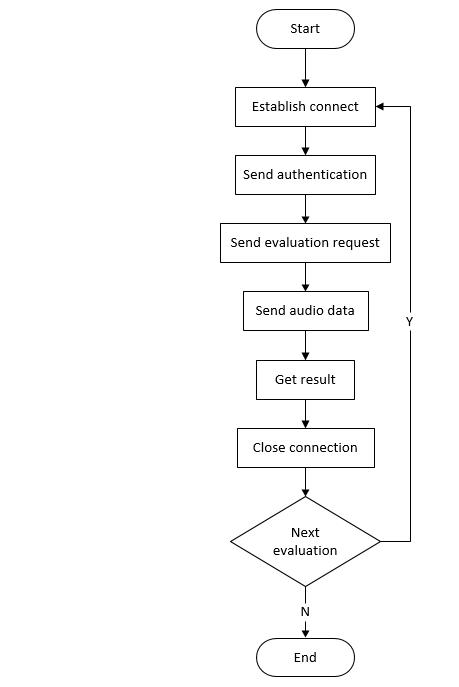
1. Establish Connection
1.1 Address Format
wss://{host}/{coreType}/{res}?appkey={your_appKey}
1.2 Parameter Description
| Field | Type | Required | Description |
|---|---|---|---|
host |
string | Required | Server address. Please contact Chivox to obtain the dedicated server address |
coreType |
string | Required | Kernel type |
res |
string | Optional | Resource type |
your_appKey |
string | Required | Chivox-provided appKey |
For details on the {coreType} and {res} parameters, see English Kernel Doc and Chinese Kernel Doc for parameter configuration instructions.
These two parameters must remain consistent with request.coreType and request.res in the Send evaluation request section below.
1.3 Connection Example
Example 1
wss://cloud.chivox.com/en.sent.score?appkey=your_appKey
Example 2
wss://cloud.chivox.com/cn.sent.raw/chn.snt.G4.A2?appkey=your_appKey
2. Send Authentication
After the connection is established, an authentication message must be sent immediately. The message format is a JSON string, sent to the backend service via a WebSocket text frame.
2.1 Parameter Description
| Field | Type | Required | Description |
|---|---|---|---|
| cmd | string | Required | Fixed value: "connect" |
| param | string | Required | Parameter root object |
| -app | object | Required | |
| -- applicationId | string | Required | Chivox-provided appKey |
| -- sig | string | Required | Signature string Generated via signature algorithm: alg(appkey + timestamp + appsecret) |
| -- alg | string | Required | Algorithm used to generate the sig signature Currently supports sha256, md5 |
| -- timestamp | string | Required | Timestamp used for signature generation, unit: milliseconds (ms) |
| -- userId | string | Required | User identifier for the application. Ensure each user's userId is unique. |
2.2 Parameter Example
{
  "cmd": "connect",
  "param": {
    "app": {
      "applicationId": "your_appKey",
      "sig": "3705f327f4xxxxxxxxxx",
      "alg": "sha256",
      "timestamp": "1710000000000",
      "userId": "ChivoxWebSocket"
    }
  }
}
3. Send Evaluation Request
After sending the authentication message, send a evaluation request.
3.1 Parameter Description
| Field | Type | Required | Description |
|---|---|---|---|
| cmd | string | Required | Fixed value: "start" |
| param | string | Required | Parameter root object |
| -app | object | Required | The content of this field is identical to that in the authentication message |
| -- applicationId | string | Required | Chivox-provided appKey |
| -- sig | string | Required | Signature string Generated via signature algorithm: alg(appkey + timestamp + appsecret) |
| -- alg | string | Required | Algorithm used to generate the sig signature Currently supports sha256, md5 |
| -- timestamp | string | Required | Timestamp used for signature generation, unit: milliseconds (ms) |
| -- userId | string | Required | User identifier for the application. Ensure each user's userId is unique. |
| -audio | object | Required | Audio format parameters |
| -- audioType | string | Required | Audio encoding format. Supports mp3 |
| -- channel | int | Required | Currently only mono is supported; must be 1 |
| -- sampleBytes | int | Required | Bytes per sample
|
| -- sampleRate | float | Required | Sample rate. Must match the actual audio |
| -request | object | Required | Evaluation request parameters. different kernel type incoming parameters are different, check English Kernel Doc and Chinese Kernel Doc for details |
| -- tokenId | string | Optional | Request ID. The server will return it unchanged in the results. |
3.2 Parameter Example
{
  "cmd": "start",
  "param": {
    "app": {
      "applicationId": "your_appKey",
      "sig": "3705f327f4xxxxxxxxxx",
      "alg": "sha256",
      "timestamp": "1710000000000",
      "userId": "user_001"
    },
    "audio": {
      "audioType": "mp3",
      "sampleRate": 16000,
      "sampleBytes": 2,
      "channel": 1
    },
    "request": {
      "tokenId": "token_001",
      ...
    }
  }
}
4. Send Audio Data
Audio binary data is sent to the backend via WebSocket binary frames. After recording ends, send a binary frame with audio length 0.
Note: WeChat Mini Programs, the Mac version of Chrome browser, and the Go language WebSocket API do not support sending binary frames with audio length 0. Instead, send the string {"cmd":"stop"} to indicate that recording has ended.
5. Receive Result
The return result of the evaluation adopts JSON structure, and the data fields returned by different kernels are different. For details, please refer to the English Kernel Doc and Chinese Kernel Doc on the left.