
/docs
iOS sdk
0.Integration Preparation
Supported Operating System Environment
- Support iOS 6.0 and above
Authorized Account
- AppKey and SecretKey
- Developer certificate aiengine.provison
SDK files
Get SDK
- CocoaPods import
  target 'ChivoxDemo' do
  pod 'chivoxSDK', :git =>'https://gitee.com/chivoxsupport/chivoxaiengine.git', :tag => '2.3.7-3.0.8'
Download
Version Updated date Details 2.3.7-3.0.8 2025.09.08 Performance Optimization Note: Only supports running on real devices. libaiengine.alibCAIEngine.aThe files in the corresponding CAIEngine folder: -
ChivoxAILogLevel.hlog information level; -ChivoxAIResTool.hresource decompression tool; -ChivoxAIRetValue.hreturns the result of the evaluation;Interface of the
ChivoxAIAudioPlayer.hplayer; -ChivoxAIRecorderNotify.hrecorder status detection; -ChivoxAIRecordParam.hrecording parameters; -ChivoxAISdkInfo.hSDK version information; -ChivoxAIAudioSrc.hrecording details; -ChivoxAIEvalResult.hvarious evaluation result data; -ChivoxAIEngine.hinterface file;
Integrate SDK with your project
- Open the Xcode and copy the SDK header files to the CAIEngine directory of the app.
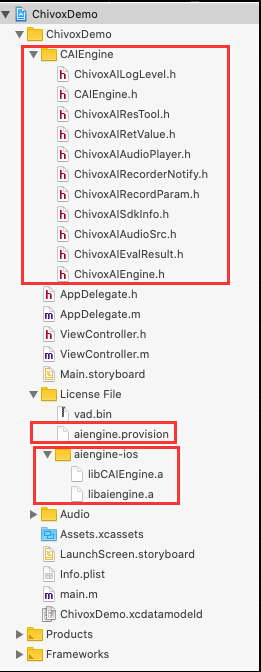
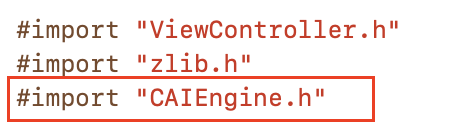
- Import CAIEngine.h .
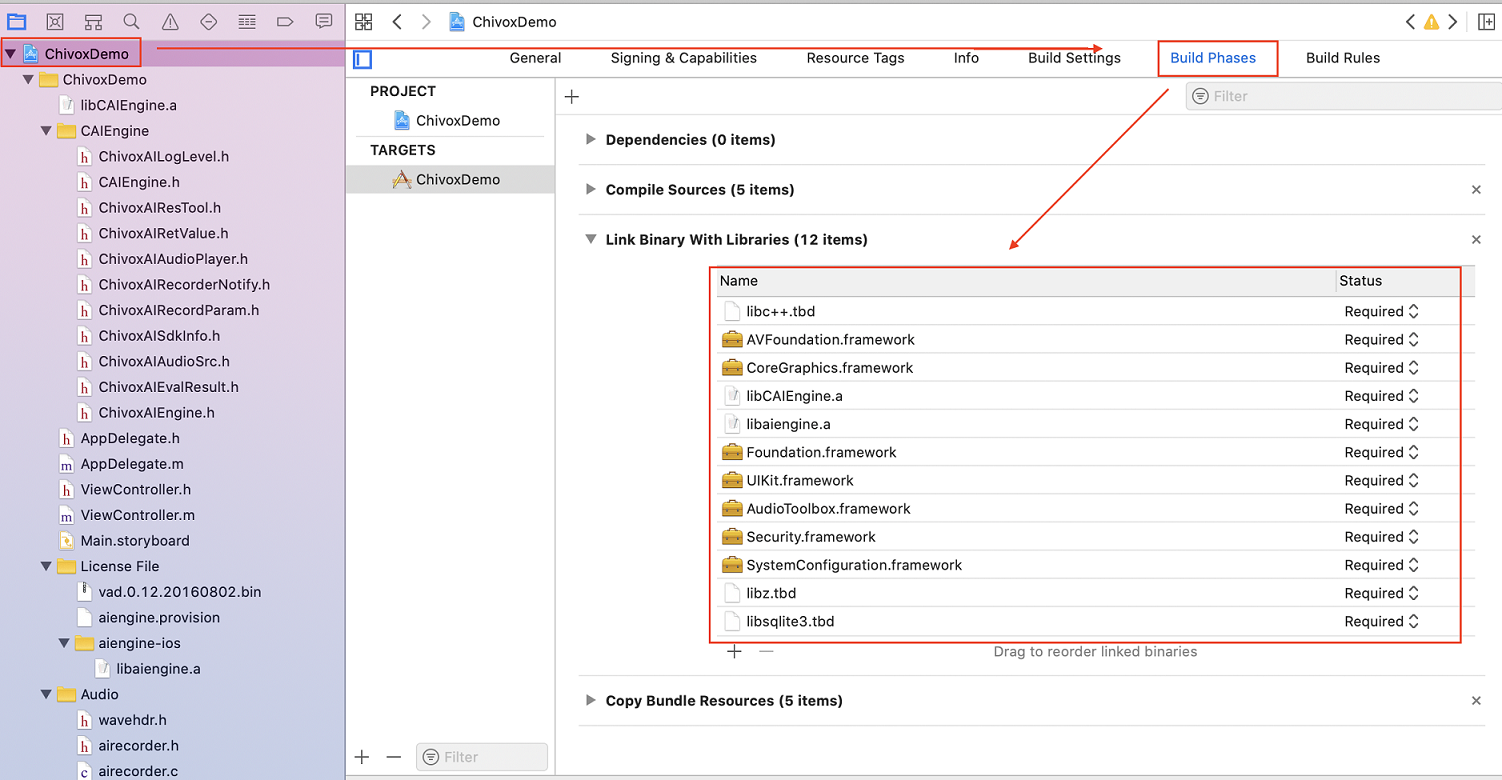
- Add related libraries through Xcode configuration as shown below:
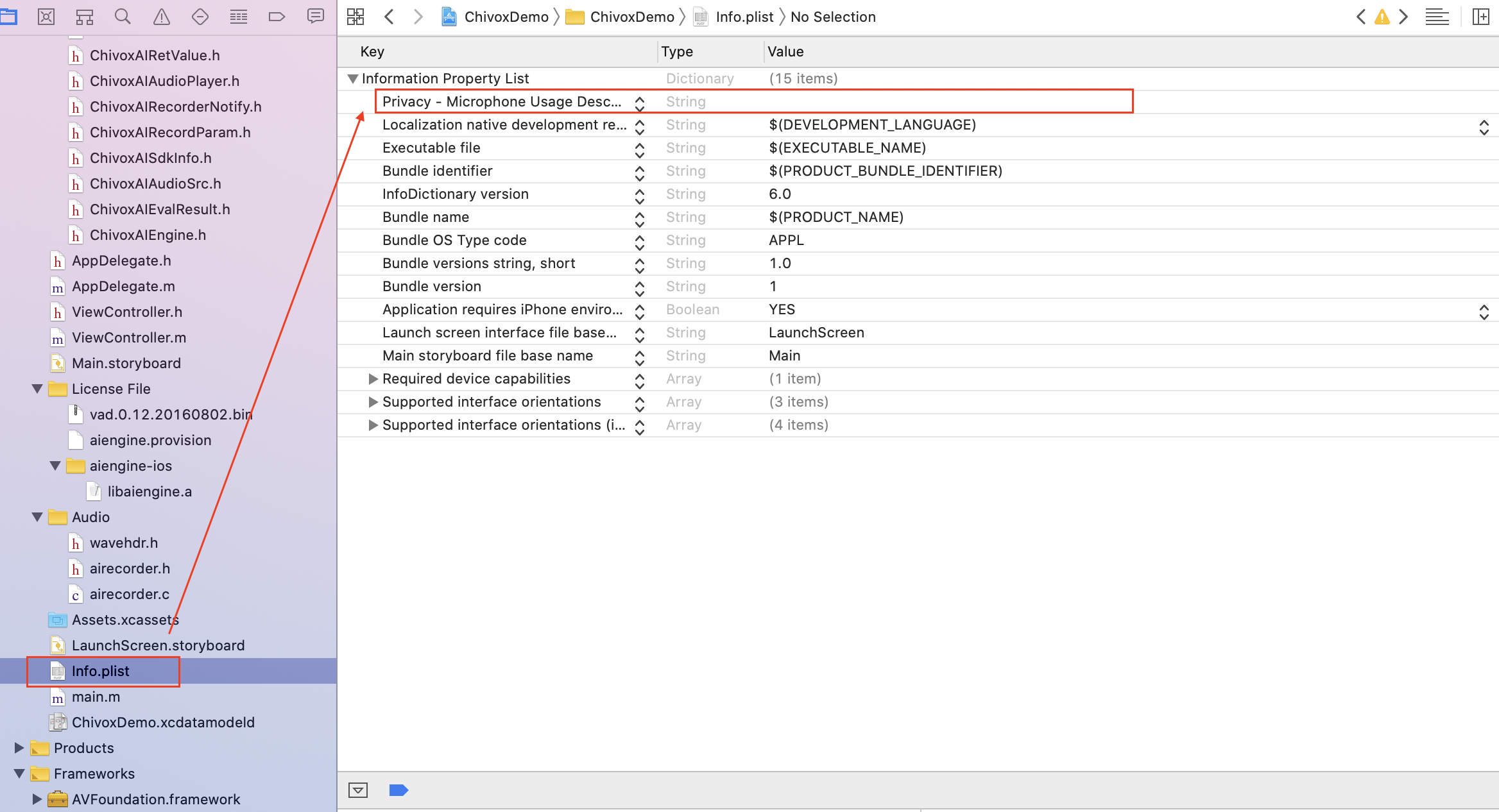
- Add recorder permission in info.plist as shown below:
 You need to add the following code in real devices (not required by the virtual device) to grant recording permission through pop-up window:

- You can then begin writing code to call the evaluation interface.
Overall Process
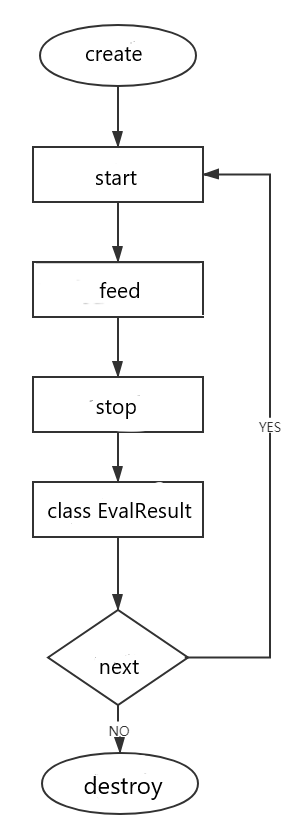
1.Create Engine
1.1 Function Prototype
- (void)create:(NSMutableDictionary *)cfg cb:(ChivoxAIEngineCreateCallback *)cb;
1.2 Function
- Create an engine instance, just create a global evaluation engine when the product starts or enter the evaluation module, and subsequent evaluations can reuse the engine. As long as the engine is not destroyed, it can be reused.
1.3 Parameters
| Parameter Name | Description |
|---|---|
| cfg | Create Engine configuration, In JSON format, refer to the cfg parameters below for details. |
| callback | Return scores or exceptions. |
1.4 Cfg Parameters
| Name | Type | Required | Description |
|---|---|---|---|
| appKey | string | true | Chivox authorized AppKey. |
| secretKey | string | true | Chivox authorized secretKey. |
| provision | string | true | Chivox authorized provison path or base64 authorization code |
| cloud | object | true | |
| - server | string | true | Server Address |
| - connectTimeout | int | false | Network connection timeout(in seconds).) |
| - serverTimeout | int | false | The timeout (in seconds) from stopping the request to accepting the score. |
| vad | object | false | Voice Activity Detection module node |
| - enable | int | false | Default 0. 1: Load vad module. 0: Not load vad module. |
| - res | string | true when vad is enabled | Vad resource path. |
| - sampleRate | int | false | Audio sampleRate,unit Hz |
| - strip | int | false | Whether to filter the silent frames in the beginning and end, default value is 1, recommend 0. |
| prof | object | false | Log function. |
| - enable | false | Optional | Defult 0. 1, enable log function 0, disable log function It is recommended to enable it during debug and disable it after official release. |
| - output | true when prof is enabled. | Optional | Log file saved path. If you debug using a simulator, the path can be set to the path on the Mac; If you debug using an iOS device, you can set the path to /dev/stdout, and the debug info will be displayed in the Xcode debugging window. |
1.5 Create Engine Sample Code
    // Build configuration information
    NSMutableDictionary *cfg = [[NSMutableDictionary alloc] init]; // Set AppKey.
    NSMutableDictionary *cloud = [[NSMutableDictionary alloc] init];// Set SecretKey.
    NSMutableDictionary *vad = [[NSMutableDictionary alloc] init];// Set Provision file path.
    NSMutableDictionary *prof = [[NSMutableDictionary alloc] init];//Set prof parameter.

	//Authorized information
    [cfg setObject:@"**********" forKey:@"appKey"];
    [cfg setObject:@"**********" forKey:@"secretKey"];
    NSString * provision = [[NSBundle mainBundle] pathForResource:@"aiengine" ofType:@"provision"];
    [cfg setObject:provision forKey:@"provision"];

	//Network connection
    [cloud setObject:@1 forKey:@"enable"];
    //The incoming parameter is of type nsnumber, which is @0, not @"0".
    [cloud setObject:@1 forKey:@"protocol"];
    [cloud setObject:@5 forKey:@"connectTimeout"];
    [cloud setObject:@10 forKey:@"serverTimeout"];
	[cloud setObject:@"wss://cloud.chivox.com:443" forKey:@"server"];

    //Prof log
	[prof setObject:@1 forKey:@"enable"];
    [prof setObject:@"/Users/chensong/Desktop/a.txt" forKey:@"output"];

    //Network initial information
    cfg[@"cloud"] = cloud;
    //Prof log
    cfg[@"prof"] = prof;

    //Engine callback
    ChivoxAIEngineCreateCallback *cb = [ChivoxAIEngineCreateCallback
          onSuccess:^(ChivoxAIEngine * _Nonnull engine) {
        self.cloudengine = engine;
        NSLog(@"success: %@",engine);
    } onFail:^(ChivoxAIRetValue * _Nonnull err) {
        NSLog(@"fail: %@",err);
    }];
    //Initial
    [ChivoxAIEngine create:cfg cb:cb];
2.Launch Evaluation Request
2.1 Function Prototype
- (ChivoxAIRetValue *)start:(ChivoxAIAudioSrc *)audioSrc tokenId:(NSMutableString *)tokenId param:(NSMutableDictionary *)param listener:(ChivoxAIEvalResultListener *)listener;
2.2 Function
- Launch evaluation request. After calling, stop or cancel need to be called to finish the evaluation progress.
2.3 Returned Value Description
| Returned Value RetValue.errId | Description |
|---|---|
| 0 | succeed |
| others | fail |
2.4 Parameter
| Parameter Name | Description |
|---|---|
| audioSrc | There are two sources of audio data1.SDK Built-in Recorder: AudioSrc.InnerRecorder; In this way, you will use the SDk built-in recoder, and you will get scores almost in real time. It only supports one audio format:
In this way, you need to send audio data from outer recorder to the engine for scoring. If you want to score audio file or use your own audio recorder, please choose this one. Support multiple audio formats:
|
| tokenId | If the start call is successful, the tokenId will be written into the ID of this evaluation, which is consistent with the tokenId returned by the evaluation result. |
| param | For details, please refer to 2.5 Evaluation Request Parameters for details. |
| listener | Evaluation result listener, for details, please refer to 5. Receive Result. |
2.5 Evaluation Request Parameters
| Name | Type | Required | Description |
|---|---|---|---|
| param | object | true | Evaluation content |
| - coreProvideType | string | true | Setting "cloud" means using the online evaluation function |
| - soundIntensityEnable | int | false | Whether to return the volume in real time.Set 0: Disable;Set 1: Enable. The volume is returned by the onSoundIntensity interface in 5. Receiving results The field is "sound_intensity", and the value range is 0~100; |
| - vad | object | false | Sound detection function |
| - - vadEnable | int | false | Default 0 1: Enable VAD. 0: Disable the VAD. |
| - - refDuration | int | false | Default 0 Set how long will the vad be disbaled after recording starts (unit: seconds) |
| - - speechLowSeek | int | false | Silence sensitivity, 20ms per frame, set N means after N*20ms of silent audio, it would return 2(time to stop engine) |
| - app | object | false | App related information |
| - - userId | string | false | User identification. It is recommended to fill in with real user account, Facilitate troubleshooting. |
| - audio | object | true | Audio information |
| - - audioType | string | true | Audio coding format |
| - - channel | int | true | Number of audio recording channels |
| - - sampleBytes | int | true | Audio sampling bits |
| - - sampleRate | int | true | Audio sampling rate |
| - request | object | true | Evaluation request, different kernels have different parameters, please refer to English Kernel Doc, Chinese Kernel Doc |
2.6 Recorder Parameters Description
| Name | Type | Required | Description |
|---|---|---|---|
| audioSrc | object | true | Recording mode 1. AudioSrc.InnerRecorder(),built-in recorder mode. See the example code in 2.7.1 below; 2. AudioSrc.OuterFeed(),external recorder mode. the external recording mode. See the example code in 2.7.2 below; |
| - recordParam.sampleBytes | true | true | Sampling bits of built-in recorder |
| - recordParam.sampleRate | int | true | Built-in recorder sampling rate |
| - recordParam.saveFile | file | true | Recording file save path including the audio name |
| - recordParam.duration | int | false | Recording duration (unit: ms) Different kernels have different audio time limit, please refer to English Kernel Doc, Chinese Kernel Doc for more details. |
2.7 Code Sample
2.7.1 Built-in Recording Mode Sample Code
ChivoxAIEvalResultListener *handler = [[ChivoxAIEvalResultListener alloc] init];//Set a listener.
handler.onEvalResult = ^(NSString * _Nonnull eval, ChivoxAIEvalResult *
        _Nonnull result) {
    NSLog(@"result:%@ path:%@",result.text,result.recFilePath);
    if (result.text == nil) {
        NSLog(@"The result returned is null!!!");
         return;
    }
     /*Get local playback file path*/
     self.audioPath = result.recFilePath;
     NSLog(@"%@filename",self.audioPath);
     dispatch_async(dispatch_get_main_queue(), ^{
         self.resultTextView.text = result.text;
         [self.indicatorView stopAnimating];
     });
};

handler.onError = ^(NSString * _Nonnull eval, ChivoxAIEvalResult *
        _Nonnull result) {
    NSLog(@"error:%@111111",result.text);
    };

handler.onVad = ^(NSString * _Nonnull eval, ChivoxAIEvalResult *
        _Nonnull result) {
	NSLog(@"vad:%@111111",result.text);
    NSData *jsonData = [result.text dataUsingEncoding:NSUTF8StringEncoding];
    NSError *err;
    NSDictionary *dic = [NSJSONSerialization JSONObjectWithData:jsonData options:NSJSONReadingMutableContainers error:&err];
    if(err) {/* JSON parsing fail.*/
        NSLog(@"JSON parsing fail.");
    }
     NSNumber *vad_status=[dic objectForKey:@"vad_status"];
    // vad_status==0 : no voice;
    // vad_status==1 : is speaking;
    // vad_status==2 : speaking end;
    // depends on the vad_status, execute the service logic
    if ([vad_status intValue] ==2){
        [self.cloudengine stop];
        dispatch_async(dispatch_get_main_queue(), ^{
        self.resultTextView.text = result.text;
        [self.recordButton setTitle:@"record" forState: UIControlStateNormal];
        [self.indicatorView stopAnimating];
        })
	}
};

handler.onOther = ^(NSString * _Nonnull eval, ChivoxAIEvalResult *
         _Nonnull result) {
	NSLog(@"other:%@111111",result.text);
	};
	handler.onSoundIntensity = ^(NSString * _Nonnull eval, ChivoxAIEvalResult * _Nonnull result) {
		NSLog(@"sound:%@111111",result.text);
	};

ChivoxAIInnerRecorder *innerRecorder = [[ChivoxAIInnerRecorder alloc] init];//Create audio source
innerRecorder.recordParam.channel = 1;
innerRecorder.recordParam.sampleRate = 16000;
innerRecorder.recordParam.sampleBytes = 2;
/*Get local playback file path*/
NSString *device_id = [ChivoxAIEngine getDeviceId];
NSString *filename = [[NSString alloc] initWithFormat:@"%@/Documents/record/%@.wav",NSHomeDirectory(),device_id];
innerRecorder.recordParam.saveFile = filename;
NSMutableDictionary *param = [[NSMutableDictionary alloc] init];//Create evaluation parameters
NSMutableDictionary *audio = [[NSMutableDictionary alloc] init];
NSMutableDictionary *vad = [[NSMutableDictionary alloc] init];
NSMutableDictionary *app = [[NSMutableDictionary alloc] init];
[param setObject:@1 forKey:@"soundIntensityEnable"];
[param setObject:@"cloud" forKey:@"coreProvideType"];
[vad setObject:@1 forKey:@"vadEnable"];
[vad setObject:@2 forKey:@"refDuration"];
[audio setObject:@"wav" forKey:@"audioType"];
[audio setObject:@16000 forKey:@"sampleRate"];
[audio setObject:@2 forKey:@"sampleBytes"];
[audio setObject:@1 forKey:@"channel"];
param[@"audio"] = audio;
param[@"soundIntensityEnable"] = @0;
param[@"vad"] = vad;
param[@"app"] = app;
NSMutableDictionary *request =  [[NSMutableDictionary alloc]init];
[request setObject:@100 forKey:@"rank"];
[request setObject:@"I want to know the past and present of Hong Kong." forKey:@"refText"];
[request setObject:@"en.sent.score" forKey:@"coreType"];
[request setObject:@1 forKey:@"attachAudioUrl"];
[param setObject:request forKey:@"request"];
param[@"coreProvideType"] = @"cloud";
NSLog(@"%@", param);
ChivoxAIRetValue * e  = nil;
[ChivoxAIRecorderNotify sharedInstance].onRecordStart = ^{
	NSLog(@"start recorder");
};
[ChivoxAIRecorderNotify sharedInstance].onRecordStop = ^{
	NSLog(@"stop recorder");
};
NSMutableString *tokenid = [[NSMutableString alloc] init]; //Tokenid passed in to get.
e = [self.cloudengine start:innerRecorder tokenId:tokenid param:param listener:handler]; //Start evaluation.
if (0 != [e errId]){
	NSLog(@"print failed message:%@",e);//print failed message.
}
2.7.2 External recorder Sample Code
handler.onError = ^(NSString * _Nonnull eval, ChivoxAIEvalResult * _Nonnull result) {
	NSLog(@"error:%@111111",result.text);
};
handler.onVad = ^(NSString * _Nonnull eval, ChivoxAIEvalResult * _Nonnull result) {
	NSLog(@"vad:%@111111",result.text);
};
handler.onOther = ^(NSString * _Nonnull eval, ChivoxAIEvalResult * _Nonnull result) {
	NSLog(@"other:%@111111",result.text);
};
handler.onSoundIntensity = ^(NSString * _Nonnull eval, ChivoxAIEvalResult * _Nonnull result) {
	NSLog(@"sound:%@111111",result.text);
};
ChivoxAIOuterFeed *outfeed = [[ChivoxAIOuterFeed alloc] init]; //Create audio source
NSMutableDictionary *param = [[NSMutableDictionary alloc] init];
NSMutableDictionary *audio = [[NSMutableDictionary alloc] init];
NSMutableDictionary *app = [[NSMutableDictionary alloc] init];
[app setObject:@"iOSUser" forKey:@"userId"];
[param setObject:@1 forKey:@"soundIntensityEnable"];
[param setObject:@"cloud" forKey:@"coreProvideType"];
[audio setObject:@"wav" forKey:@"audioType"];
[audio setObject:@16000 forKey:@"sampleRate"];
[audio setObject:@2 forKey:@"sampleBytes"];
[audio setObject:@1 forKey:@"channel"];
param[@"audio"] = audio;
param[@"soundIntensityEnable"] = @0;
param[@"app"] = app;
NSMutableDictionary *request = [[NSMutableDictionary alloc]init];
[request setObject:@100 forKey:@"rank"];
[request setObject:@"I want to know the past and present of Hong Kong." forKey:@"refText"];
[request setObject:@"en.sent.score" forKey:@"coreType"];
[request setObject:@1 forKey:@"attachAudioUrl"];
[param setObject:request forKey:@"request"];
param[@"coreProvideType"] = @"cloud";
NSLog(@"%@", param);
ChivoxAIRetValue * e = nil;
[ChivoxAIRecorderNotify sharedInstance].onRecordStart = ^{
	NSLog(@"start recorder");
};
[ChivoxAIRecorderNotify sharedInstance].onRecordStop = ^{
	NSLog(@"stop recorder");
};
NSMutableString *tokenid = [[NSMutableString alloc] init];
e = [self.cloudengine start:outfeed tokenId:tokenid param:param listener:handler];
if(e){
	NSLog(@"%@",e);//Print fail reason.
}
resultTextView.text = @"";
[indicatorView startAnimating];
[recordButton setTitle:@"stop" forState: UIControlStateNormal];
3.Send Audio Data
3.1 Function Prototype
- (ChivoxAIRetValue *)feed:(const void *)bytes length:(int)length;
3.2 Funtion
- The external recording mode needs to call this method to transfer audio data, the internal recording mode does not need this method.
3.3 Parameters
bytes: Audio data.
length: Data length.
#### 3.4 Returned Value Description {docsify-ignore}
- RetValue.errId == 0 Indicates the call is successful, otherwise failed.
** Sample Code:**
if(!file){
	printf("read file error!\n");
	return;
}
//  fseek(file, 44, SEEK_SET);
while ((bytes = (int)fread(buf, 1, 1024, file))){
	ChivoxAIRetValue *value = [self.cloudengine feed:buf length:bytes];
	if (0 != [value errId]) {
	// Feed call failed, usually because the call sequence is wrong. Please check ret.errId, ret.error to analyze the reason.
	// It is recommended to call eval.cancel() here to cancel the evaluation.
	NSLog(@"%@",value);//print failed message.
	[self.cloudengine cancel];
	return;
}
4. Stop Request
4.1 Function Prototype
- (ChivoxAIRetValue *)stop;
4.2 Function
- Call this method to stop recording and submit evaluation. The evaluation score will be returned by ChivoxAIEvalResultListener later.
Note: The stop method must be called in a pair with Launch Evaluation Request, otherwise the start will report an error next time. If the recording duration is specified when using the built-in recording evaluation, then when the recording duration arrives, stop will be automatically called inside the SDK, and the business layer does not need to call it.
4.3 Returned Value Description
- RetValue.errId == 0 means the call is successful, otherwise failed..
4.4 Sample Code
[self.cloudengine stop];
5. Receive Results
5.1 Receiving Result Interface:
Interface ChivoxAIEvalResultListener
It is set in the request listener parameter settings: Launch Evaluation Request
@interface ChivoxAIEvalResultListener : NSObject
//Evaluation result.
@property (nonatomic, strong) void (^onEvalResult)(NSString *tokenId, ChivoxAIEvalResult *result);
//Binary result returned.
@property (nonatomic, strong) void (^onBinResult)(NSString *tokenId, ChivoxAIEvalResult *result);
//Wrong with Evaluation.
@property (nonatomic, strong) void (^onError)(NSString *tokenId, ChivoxAIEvalResult *result);
//vad检测结果
@property (nonatomic, strong) void (^onVad)(NSString *tokenId, ChivoxAIEvalResult *result);
//Sound intensity.
@property (nonatomic, strong) void (^onSoundIntensity)(NSString *tokenId, ChivoxAIEvalResult *result);
//Reserved expansion interface.
@property (nonatomic, strong) void (^onOther)(NSString *tokenId, ChivoxAIEvalResult *result);
@end
5.2 Evaluation Result Class
- interface ChivoxAIEvalResult
[Instance Method]
String tokenId(); Return the evaluation unique ID.
boolean isLast(); Return whether it is the final result of this evaluation.
String text(); Return the result data when the following EvalResultListener interfaces are called:
void onError(Eval eval, EvalResult result);
void onEvalResult(Eval eval, EvalResult result);
void onVad(Eval eval, EvalResult result);
void onSoundIntensity(Eval eval, EvalResult result);
- Data data(); Return the result data when the following EvalResultListener interfaces are called:
void onBinResult(Eval eval, EvalResult result);
- String recFilePath(); Return recording file path if the recording file is saved successfully, otherwise return null.
5.3 Return Result Code Example
handler.onEvalResult = ^(NSString * _Nonnull eval, ChivoxAIEvalResult * _Nonnull result) {
	NSLog(@"result:%@ path:%@",result.text,result.recFilePath);
	if (result.text == nil) {
		NSLog(@"the value returned is null!!!");
		return;
	}
	/*Get local playback file path*/
	self.audioPath = result.recFilePath;
	NSLog(@"%@filename",self.audioPath);
	dispatch_async(dispatch_get_main_queue(), ^{
		self.resultTextView.text = result.text;
		[self.indicatorView stopAnimating];
	});
};
handler.onError = ^(NSString * _Nonnull eval, ChivoxAIEvalResult * _Nonnull result) {
	NSLog(@"error:%@111111",result.text);
};
handler.onVad = ^(NSString * _Nonnull eval, ChivoxAIEvalResult * _Nonnull result) {
	NSLog(@"vad:%@111111",result.text);
	// result returned sample:{"vad_status": 0, "sound_intensity": 12.0}
	   // vad_status: Vad detection status, the value is 0,1,2, status description:
       // 0:vad starts to detect and is in silent state;
       // 1:vad detects the recording;
       // 2:The vad detection is over and the recording is muted again.

};
handler.onOther = ^(NSString * _Nonnull eval, ChivoxAIEvalResult * _Nonnull result) {
	NSLog(@"other:%@111111",result.text);
};
handler.onSoundIntensity = ^(NSString * _Nonnull eval, ChivoxAIEvalResult * _Nonnull result) {
	NSLog(@"sound:%@111111",result.text);
};
6.Cancel Request
6.1 Function Prototype
- void cancel();
6.2 Function
- Cancel the current evaluation request.
Note: if you call cancel() after calling start(), you do not need to call Stop().
6.3 Code Sample
// Cancel to get evalution result
[self.cloudengine cancel];
7.Destroy Engine
7.1 Method Prototype
- (void)destory;
7.2 Function
- Destroy the engine and release resources. After the engine is destroyed, it can't be used for evaluation again.
Note: This method will be called automatically when the engine is recycled if you don't call this method manually. But the timing of engine recycled is uncertain, so it is recommended to call manually.
7.3 Code Sample
// destroy engine
[self.cloudengine destory];
8. Playback Audio
8.1 Playback Audio Class
- (ChivoxAIAudioPlayer *)sharedInstance; Function:Return singleton of AudioPlayer.
- (void)setListener:(ChivoxAIAudioPlayerListener*)_event; Function:Set listener.
- (void)playFile:(NSString *)path; Function:Start Playback audio in the path. Patameter: path - audio file path.
- void cancel(); Function:Cancel playback.
- ChivoxAIAudioPlayerListener Function:Audio playback listener.
- @property (nonatomic, strong) void (^onStarted)(ChivoxAIAudioPlayer *ap); Function:It is called when the player starts playback.
- @property (nonatomic, strong) void (^onStopped)(ChivoxAIAudioPlayer *ap); Function:It is called when the player finishes callback.
- @property (nonatomic, strong) void (^onError)(ChivoxAIAudioPlayer *ap, NSString *err); Function:It is called when the player callback occurs errors.
8.2 Playback Audio Code Sample
self.player = [ChivoxAIAudioPlayer sharedInstance];
ChivoxAIAudioPlayerListener *event = [[ChivoxAIAudioPlayerListener alloc] init];
event.onStarted = ^(ChivoxAIAudioPlayer *ap) {
	[self.playbackButton setTitle:@"stop" forState: UIControlStateNormal];
	self.playbackButton.userInteractionEnabled=NO; //Interactive close.
	NSLog(@"start");
};
event.onError = ^(ChivoxAIAudioPlayer *ap, NSString *err) {
	self.playbackButton.userInteractionEnabled=YES; //Interactive open.
	[self.playbackButton setTitle:@"playback" forState: UIControlStateNormal];
	NSLog(@"error : %@",err);
};
event.onStopped = ^(ChivoxAIAudioPlayer *ap) {
	self.playbackButton.userInteractionEnabled=YES; //Interactive open.
	[self.playbackButton setTitle:@"playback" forState: UIControlStateNormal];
	NSLog(@"stop");
};
[self.player setListener:event];
[self.player playFile:self.audioPath];
9.Other interface
Get SDK version
NSString * sdkVersion= [NSString stringWithFormat:@"%@%@%@%@", @"sdk version: ",[[ChivoxAIEngine sdkInfo] commonSdkVersion],@"-",[[ChivoxAIEngine sdkInfo] version]];
        NSLog(@"sdk version:%@ ", sdkVersion);