
/docs
Android sdk 4.X
0. Preparation
Dependency
- Android API Level >=14 (Android 4.0 以上)
- Java 1.7+
Authorized account
- AppKey and SecretKey
- Developer certificate aiengine.provision
SDK file
Get SDK
- Download
Version Release date Details 4.0.1 2025.09.17 Support 16 KB Page Size Alignment
- library files:libchivoxagnnative.so
- jar file:aiengine-android-release.aar
Integrate SDK into your project
- Put aiengine-android-release.aar into the 'libs' directory;
- Add the following to the dependencies field in app/build.gradle;
   implementation 'com.squareup.okhttp3:okhttp:3.14.9'
   implementation files('libs\\aiengine-android-release.aar')
- Put the libchivoxagnnative.so files of different CPU architectures into the JniLibs directory;
- Put the developer certificate aiengine.provision into the assets directory, as shown below;
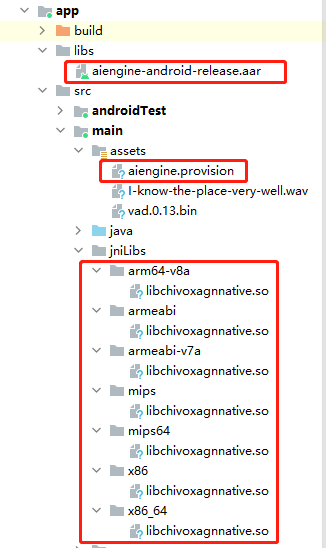
- Note: If you use code obfuscation,Please fill in the following rules in the proguard-rules.pro file: -keep public class com.chivox.* {*;}
SDK-related permissions
<uses-permission android:name="android.permission.RECORD_AUDIO" />
<uses-permission android:name="android.permission.INTERNET" />
<uses-permission android:name="android.permission.READ_EXTERNAL_STORAGE" />
<uses-permission android:name="android.permission.WRITE_EXTERNAL_STORAGE" />
<uses-permission android:name="android.permission.ACCESS_WIFI_STATE" />
<uses-permission android:name="android.permission.READ_PHONE_STATE" />
Overall process
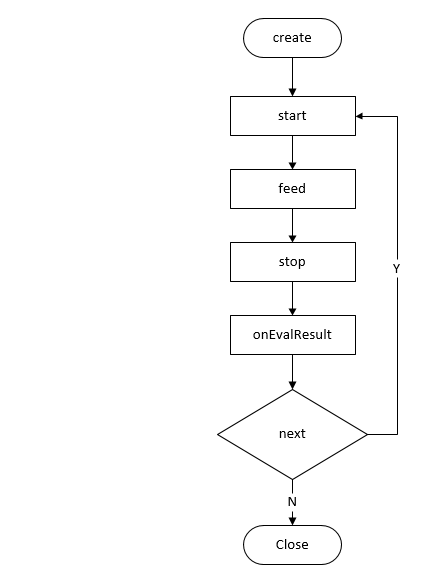
1.Create Engine
1.1Function Prototype
- static void create(JSONObject cfg, CreateCallback callback);
1.2Function
- Create an engine instance, create a global evaluation engine when the app initials or when needed, and reuse the engine for subsequent evaluation.
- It is recommended that this interface be called at the program entry point, such as the Application, Activity's onCreate method.
1.3Parameters
| Parameter | Description |
|---|---|
| cfg | Engine configuration, In JSON format, refer to the cfg parameters below for details. |
| callback | Evaluation result |
1.4 Cfg Parameters
| Name | Type | Required | Description |
|---|---|---|---|
| appKey | string | true | Chivox authorized AppKey |
| secretKey | string | true | Chivox authorized secretKey |
| provision | string | true | Chivox authorized provison path or base64 authorization code. |
| cloud | object | true | |
| - server | string | true | Server Address |
| - connectTimeout | int | false | Network connection timeout(in seconds) |
| - serverTimeout | int | false | The timeout (in seconds) from stopping the request to receiving results |
| vad | object | false | Voice Activity Detection module node |
| - enable | int | false | Default 0. 1: Load vad module. 0: Not load vad module. |
| - res | string | true when vad is enabled | Vad resource path |
| - sampleRate | int | false | Audio sampleRate,unit Hz |
| - strip | int | false | Whether to filter the silent frames in the beginning and end, default value is 1, recommend 0 |
| prof | object | false | Log function node |
| - enable | int | false | Defult 0. 1, enable log function 0, disable log function It is recommended to enable it during debug and disable it after official release. |
| - output | String | true when prof is enabled. | The log file save path. |
1.5 Create Engine Sample Code
   Engine.setAndroidContextProvider(() -> this);//get AndroidContext

  //Build configuration information
    JSONObject cfg = new JSONObject();
    cfg.put("appKey", "******");            // set AppKey
    cfg.put("secretKey", "******");        // set SecretKey
    cfg.put("provision", "/path/to/aiengine.provision");    // set Provision file
    { // Vad module, optional
      JSONObject vad = new JSONObject();
      vad.put("enable", 0);    //vad function
      vad.put("res", "/path/to/vad.bin");        //set vad resource path
      cfg.put("vad", vad);
    }
    {
      JSONObject prof = new JSONObject();
      prof.put("enable", 1);
      prof.put("output", "/path/to/agn_prof.log");
      cfg.put("prof", prof);
    }
    {
      JSONObject cloud = new JSONObject();
      cloud.put("server", "wss://cloud.chivox.com:443");
      cfg.put("cloud", cloud);
    }

    Engine.create(cfg, (e, engine) -> {
        // Create engine callback
        if (e != null) {
            //Creation failed, please check e.errId and e.error to analyze the reason.
            Log.e("TAG", "create aiengine fail, error code "+ e.getCode()+"error message" + e.getMessage());

            return;
        }
        else {
            Log.e(TAG, "create success!");
        }
    });
2. Make a request
2.1Function Prototype
void start(JSONObject param) throws AgnException;
2.2Function
After calling, you need to call the stop or cancel interface to terminate this request.
2.3Class Eval.Builder
Evaluation instance creator. Create an instance for each request.
2.3.1 Construction method
Builder(@NonNull Engine engine);
2.3.2 Set the audio source
Builder setAudioSource(@NonNull AudioSource audioSource);
Class:
enum AudioSource {
    InnerRecorder,
    OuterFeed,
}
| Mode | Description | Supported audio formats |
|---|---|---|
| InnerRecorder | The SDK has integrated system recorder related operations, which is suitable for instant score output scenarios | Only supports one audio format:
|
| OuterFeed | In this way, you need to send audio data from outer recorder to the engine for scoring.If you want to score audio file or use your own audio recorder, please choose this one. The evaluation time is positively correlated with the audio length. | Support multiple audio formats:
|
2.3.3 Set recording duration
Unit: milliseconds
Builder setRecordDuration(int d);
2.3.4 Set local path for recording files
Builder setRecordSave(File f);
2.4 Set callback function
1 Evaluation result related callback function
// 1. Set evaluation error callback
eval.callback.onError = (eval_, json) -> {};
// 2. Set evaluation result callback
eval.callback.onEvalResult = (eval_, json) -> {};
// 3. Set vad status callback
eval.callback.onVadStatus = (eval_, vadStatus) -> {};
// 4. Set the soundIntensity callback
eval.callback.onSoundIntensity = (eval_, soundIntensity) -> {};
2 Recorder event callback
// 1. Set the recording start callback
eval.callback.onRecorderStart = (eval_) -> {};
// 2. Set real-time recording data callback
eval.callback.onRecorderData = (eval_, data) -> {};
// 3. Set the recording end callback
eval.callback.onRecorderStop = (eval_, saveFile, duration) -> {};
// 4. Set the recorder error callback
eval.callback.onRecorderError = (eval_, info) -> {};
2.5 Evaluation Request Parameters
| Name | Type | Required | Description |
|---|---|---|---|
| param | object | true | Evaluation content |
| - coreProvideType | string | true | Setting "cloud" means using the online evaluation function |
| - soundIntensityEnable | int | false | Whether to return the volume in real time. Set 0: Disable;Set 1: Enable. The volume is returned by the onSoundIntensity interface in 5.Receiving result onSoundIntensity, and the value range is 0~100; |
| - vad | object | false | Sound detection function |
| - - vadEnable | int | false | Default 0 1: Enable VAD. 0: Disable the VAD. |
| - - refDuration | int | false | Default 0 Set how long will the vad be disbaled after recording starts (unit: seconds) |
| - - speechLowSeek | int | false | Silence sensitivity, 20ms per frame, set N means after N*20ms of silent audio, it would return 2(time to stop engine) |
| - app | object | true | |
| - - applicationId | string | true | Chivox appKey |
| - - sig | string | true | Signature strings are generated by the signature algorithm alg (appkey stimestamp s appsecret). |
| - - alg | string | true | The algorithm that generates the sig signature currently supports sha256, md5 |
| - - timestamp | string | true | Timestamp for generating signatures in milliseconds (ms) |
| - - userId | string | false | User identification. It is recommended to fill in with real user account, Facilitate troubleshooting. |
| - audio | object | true | Audio information |
| - - audioType | string | true | Audio coding format |
| - - channel | int | true | Number of audio recording channels |
| - - sampleBytes | int | true | Audio sampling bits |
| - - sampleRate | int | true | Audio sampling rate |
| - request | object | true | Evaluation request, different kernels have different parameters, please refer to English Kernel Doc, Chinese Kernel Doc |
2.7 InnerRecorder mode sample code
    // Configure evaluation parameters
    JSONObject param = new JSONObject();
    try {
      param.put("coreProvideType", "cloud");
      { // Set the VAD parameter if necessary
        JSONObject vad = new JSONObject();
        vad.put("vadEnable", 1);
        vad.put("refDuration", 2);
    	vad.put("speechLowSeek",20);
        param.put("vad", vad);
      }
      //param.put("soundIntensityEnable", 1);   //Whether to return the volume in real time. The value is 0,1, and the default value is 0. 1, indicating the real-time return volume. 0 means no return.
      { // Set app related information
        JSONObject app = new JSONObject();

        long timestamp = System.currentTimeMillis();
        String sig = Config.appKey+timestamp+Config.secretKey;
        sig = MD5.getDigest(sig);

        app.put("applicationId", Config.appKey);
        app.put("sig", sig);
        app.put("alg", Config.alg);
        app.put("timestamp", String.valueOf(timestamp));
        app.put("userId",Config.userId);
        param.put("app", app);
      }
      { // Set the audio properties, InnerRecorder mode to support wav, 16bit, 1600 sampling rate of this audio format
        JSONObject audio = new JSONObject();
        audio.put("audioType", "wav");
        audio.put("channel", 1);
        audio.put("sampleBytes", 2);
        audio.put("sampleRate", 16000);
        param.put("audio", audio);
      }
      { // Kernel request parameters
        JSONOjbect request = new JSONObject();
        request.put("coreType", "en.word.score");   //Evaluation kernel, English word kernel
        request.put("accent", 1);   //American or British accent
        request.put("refText", "present");  //Evaluation text
        request.put("rank", 100);  //Scoring system
        request.put("attachAudioUrl", 1);  //Whether to return the audio URL. 1: yes. 0: no.
        param.put("request", request);
      }
    } catch(JSONException e) {
      // exception
      return;
    }

    //Create an instance
    Eval eval = new Eval.Builder(aiengine)
            .setAudioSource(AudioSource.InnerRecorder)
            .setRecordDuration(25000)  //If you need to stop recording automatically, you can set the recording time.(Unit: milliseconds)
            .setRecordSave(file)
            .build();

    RecorderInstance = eval;

    eval.callback.onRecorderStart = (eval_) -> {
        Log.e(TAG, "start recording");
    };

    eval.callback.onRecorderStop = (eval_, saveFile, duration)-> {
        if(null != saveFile)
        {
            Log.e(TAG, "Save audio successfully! path: "+ saveFile);
            recFilePath = saveFile.toString();
        }
    };
    eval.callback.onRecorderError = (eval_, info) -> {
        Log.e(TAG, "recorder error: " +info);
    };


    eval.callback.onError = (eval_, json) ->
    {
        Log.e(TAG, "onError: "+json);
    };

    //Assessment result
    eval.callback.onEvalResult = (eval_, json) ->
    {
        Log.e(TAG, "onEvalResult: "+json);
    };

    eval.callback.onSoundIntensity = (eval_, soundIntensity) -> {
        Log.e(TAG, "Sound Intensity: " + soundIntensity);
    };

    eval.callback.onVadStatus = (eval_, vadStatus) ->
    {
        Log.e(TAG, "onVadStatus: " + vadStatus);
    };


     try {
         eval.start(param);
     } catch (AgnException e) {
         eval.cancel();
     }
3. Send Audio Data
3.1 Function Prototype
void feed(@NonNull byte[] data, int len) throws AgnException;
3.2 Function
- Only OuterFeed mode needs to call this interface to send audio data.
3.3 Parameters
data:Audio data
len: Data length
3.4 Sample code
      try {
          while (-1 != (bytes = fis.read(buf, 0, 1024))) {
              eval.feed(buf, bytes);
          }
          System.out.println("end read file(feed)");
      } catch (IOException | AgnException e) {
          e.printStackTrace();
      }
4. Stop Request
4.1 Function Prototype
void stop() throws AgnException;
4.2 Function
- End the current evaluation request, After calling, it will enter the stage of waiting for evaluation results.
>Note: The stop interface must be called in pairs with the start interface, otherwise the next calling will report an error. If the recording duration is specified when using InnerRecorder mode, the stop interface will be automatically called within SDK, and you don't need to call manually.
4.4 Sample code
    try {
        RecorderInstance.stop();
    } catch (AgnException e) {
        e.printStackTrace();
    }
5. Receiving results
- The evaluation result is received through the callback function set in the 2. make a request interface.
// 1. Set evaluation error callback
eval.callback.onError = (eval_, json) -> {};
// 2. Set evaluation result callback
eval.callback.onEvalResult = (eval_, json) -> {};
// 3. Set vad status callback
eval.callback.onVadStatus = (eval_, vadStatus) -> {};
// 4. Set the soundIntensity callback
eval.callback.onSoundIntensity = (eval_, soundIntensity) -> {};
6. Cancel Request
6.1 Function Prototype
- void cancel();
6.2 Function
- Cancel the current evaluation request.
Note: if you call cancel() after calling start(), you do not need to call Stop().
6.3 Sample code
eval.cancel();
7. Destroy Engine
7.1 Function Prototype
- void close();
7.2 Function
- Destroy engine and Release resources. After the engine is destroyed, it can't be used for evaluation.
7.3 Sample code
aiengine.close();
8. Playback Audio
class AudioPlayer
Audio playback class
- [Static method] static AudioPlayer sharedInstance(); Function:Return singleton of AudioPlayer.
- [Member Method] void play(String path, Listener listener); Function:Playback the audio in path.
- parameter path - Audio file path; listener - Play status notification, supports passing null
- [Member method] void cancel(); Function:Cancel playback.
Sample code
    player.play(recFilePath, playerListener);

    public AudioPlayer.Listener playerListener = new AudioPlayer.Listener()
    {
        @Override
        public void onStart(AudioPlayer audioPlayer)
        {
            playing = true;
        }

        @Override
        public void onStop(AudioPlayer audioPlayer)
        {
            playing = false;
        }

        @Override
        public void onError(AudioPlayer audioPlayer, String s)
        {
            playing = false;
        }
    };
9. Other interface
Get SDK version
    String sdkVersion = Version.DOT_STRING;

    Log.d(TAG, "sdkVersion:" + sdkVersion);