/docs
CSharp sdk
0. Integration Preparation
Supported operating environment
- Support Windows XP and above
Authorized account
- AppKey and SecretKey
- Developer certificate aiengine.provison
SDK files
- Dynamic library file: aiengine.dll
Server address
- wss://cloud.chivox.com:443
Integrate SDK in the project
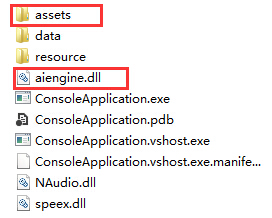
- Copy the SDK file
aiengine.dllto the C# project in the same level directory as the executable program (such as the debug directory); - Copy the developer certificate
aiengine.provisionto the C# project (usually in the assets directory at the same level as the executable program, it is not mandatory, as long as the path written in the code matches the storage path); as shown in the figure below Show:
Overall process
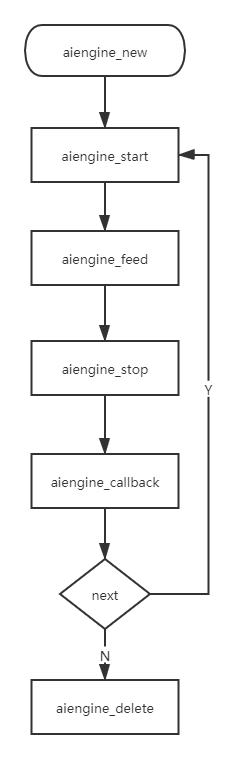
1. Create an engine
Function prototype
- public static extern IntPtr aiengine_new(string cfg);
Function
- Create an engine instance, just create a global evaluation engine when the product starts or enter the evaluation module, and subsequent evaluations can reuse the engine. As long as the engine is not destroyed, it can be reused.
Parameter:
| Argument | Description |
|---|---|
| cfg | Engine related configuration, JSON format, should include appKey, secretKey, provision and other information. |
cfg example
 {
    "appKey": "**********", //Required
    "secretKey": "a3bed5523bbc020cf4a****", //Required
    "provision": "path-of-provision-profile",//Required, development certificate storage path
    "cloud": {
		"server": "wss://cloud.chivox.com:443", // required, cloud service address
		"connectTimeout": 20, //Optional, the default is 20s, the timeout period for establishing a network connection, the time is calculated from when the interface is called
		"serverTimeout": 60 //Optional, the default is 60s, the response timeout time, the time starts from stopping the engine
    },
	"vad": {//Optional, voice activity detection
		"enable": 1, //Optional, default 0. Set to 1 means that the engine created this time loads the voice activity detection function module. Setting it to 0 means that the engine created this time does not load the voice activity detection function.
		"res": "./assets/vad.0.12.bin", //optional, vad resource path
		"sampleRate": 16000, //optional, audio sampling rate, unit is Hz
		"strip": 0 //Optional, whether to cut off the leading and trailing blanks when transmitting the audio data to the upper layer, generally set to 0
	},
    "prof": {//Debug function, optional
        "enable": 0, //Debugging switch, disabled by default. Generally open during development and debugging stage, it is recommended to close before the product goes online
        "output": "log-file-path" //If the debugging function is enabled, it must be selected, the debug log path, after configuration, the log information will be output to this directory
    }
}
Return value description
| Return Value | Description |
|---|---|
| Return instance pointer | Success |
| Return NULL | Failed, you should check the parameters at this time |
Create engine sample code
 IntPtr m_engine;
 public static extern IntPtr aiengine_new(string cfg);
 /* Create engine instance */
   public AiEngine()
        {
            _callback = callback;
            string cfg = "{\"appKey\":\"" + appKey + "\",\"secretKey\": \"" + secretKey + "\", \"provision\": \"./assets/aiengine .provision\", \"vad\":{\"enable\": 1, \"res\": \"./assets/vad.0.13.bin\", \"sampleRate\": 16000,\" strip\": 0}, \"prof\":{\"enable\":1, \"output\":\"./assets/log.txt\" }, \"cloud\": {\" server\": \"wss://cloud.chivox.com:443\",\"serverTimeout\": 10}}";
           Console.WriteLine("cfg:" + cfg);
            if (m_engine == IntPtr.Zero)
            {
                m_engine = aiengine_new(cfg);
            }
            Console.WriteLine("engineId:" + m_engine);
        }
2. Make a request
Function prototype
- public static extern int aiengine_start(IntPtr engine, string param, byte[] id, [MarshalAs(UnmanagedType.FunctionPtr)]aiengine_callback callback, IntPtr usrdata);
Function
- Start this request
Parameter:
| Argument | Description |
|---|---|
| Engine | Pointer to engine instance |
| Param | Startup parameter, JSON format. Includes three parts: app (application-related information), audio (audio format parameters), request (kernel-related parameters).
This method is suitable for scenarios where scores are not instantaneously given. The time consumed for evaluating audio is related to the audio duration. The longer the audio, the longer the evaluation time. Support multiple audio formats: |
| Id | RequestId, pass in an empty character array before the call, after the call, the SDK will record the unique request ID generated in it, which corresponds to the tokenId in the evaluation result |
| Callback | Callback function, scoring results and exceptions in scoring will be triggered in this callback function |
| Usrdata | Callback parameters, passed in at aiengine_start, can be brought back as-is in the callback function |
Evaluation request parameter description
| Name | Type | Option | Description |
|---|---|---|---|
| param | object | required | Review the content |
| - coreProvideType | string | required | Set up "cloud" |
| - soundIntensityEnable | int | optional | Whether to return the volume in real time, default 0, if set 1, the volume size through5.Receive the results of the onSoundIntensity interface callback, the parameter is "sound_intensity", the value range 0 to 100; |
| - vad | object | optional | Sound detection |
| - - vadEnable | int | optional | The default is 0. 1 indicates that vaD functionality is enabled for this review. 0 indicates that vad is not enabled in this review. |
| - - refDuration | int | optional | Sets the length of time the audio vad delay takes effect (in seconds), which is to mask the VAD within seconds of the start of recording |
| - - speechLowSeek | int | optional | Sensitivity, in 20ms, set N (default 15), indicates that the speech stops after 20 x N milliseconds are determined to be the end |
| - app | object | optional | App-related information |
| - - userId | string | optional | End-user identification. It is recommended to fill in the user Id according to the user account number, so as to facilitate troubleshooting. |
| - audio | object | required | audio information |
| - - audioType | string | required | Audio encoding format |
| - - channel | int | required | The number of audio channels |
| - - sampleBytes | int | required | The number of audio samples |
| - - sampleRate | int | required | Audio sample rate |
| - request | object | required | Kernel-related parameters, different kernel request parameters are different, please refer to English Kernel Doc, Chinese Kernel Doc |
Param example
 {
	"coreProvideType": "cloud", // Required, online evaluation needs to be configured as "cloud"
	"soundIntensityEnable": 0, //Optional, default 0, that is, no volume value is returned. If set to 1, the volume value is returned. The value is returned by callback, the parameter is "sound_intensity", the value range is 0-100
	"vad": {//Optional |Sound detection function|
        "vadEnable": 1, //Optional, default 0. Setting 1 means the VAD function is enabled for this evaluation. Setting 0 means that the vad function is not enabled for this evaluation.
        "refDuration": 3, //Optional, set the duration of audio vad delay (unit: seconds), that is, block VAD within a few seconds of the first recording
		"speechLowSeek": 50 //Optional, sensitivity, unit 20ms, set to N, it means that 20*N milliseconds after the stop of speaking is judged to be the end
	},
    "app": {// part1: application related information
        "userId": "guest", // Optional, the user ID in the application
    },
    "audio": {// part2: audio format parameters
        "audioType": "wav", // required, audio encoding format
        "channel": 1, // required, currently only supports mono, only 1
        "sampleBytes": 2, // required, the number of bytes per sample, support: 1 (single byte, 8 bits) and 2 (double byte, 16 bits)
        "sampleRate": 16000, // required, the sampling rate must be consistent with the actual audio
    },
    "request": {// part3: voice service parameters (**see the kernel documentation** for details)
       ......
    }
}
Return value description
| Return Value | Description |
|---|---|
| 0 | Success |
| -1 | Failed, you should call aiengine_stop immediately to get the reason for failure |
Code sample
public static extern int aiengine_start(IntPtr engine, byte[] param, byte[] id, [MarshalAs(UnmanagedType.FunctionPtr)]aiengine_callback callback, IntPtr usrdata);


string EngineText = "I want to know the past and present of Hong Kong.";
string param = "{\"coreProvideType\": \"cloud\", \"vad\": {\"vadEnable\": 1, \"refDuration\": 3, \"speechLowSeek\": 50},\ "sound_intensityEnable\": 1, \"app\": {\"userId\": \"yx_demo\"}, \"audio\": {\"audioType\": \"wav\",\"sampleRate\ ": 16000,\"channel\": 1,\"sampleBytes\": 2}, \"request\": {\"coreType\": \"en.sent.score\",\"rank\": 100,\"precision\":0.5,\"client_params\": {\"ext_subitem_rank4\": 0}, \"attachAudioUrl\": 1, \"refText\":\"" + EngineText + "\"} }}";
byte[] parambytes = Encoding.UTF8.GetBytes(param);
Console.WriteLine("param:" + param);
string usrdata = "this-is-usrdata";
int rv = 0;
byte[] record_id = new byte[64];
byte[] device_id = new byte[64];
rv = aiengine_start(m_engine, parambytes, record_id, _callback, GCHandle.ToIntPtr(GCHandle.Alloc(usrdata, GCHandleType.Normal)));
if (rv != 0){
    Console.WriteLine("start aiengine failed");
    return;
   }
3. Send audio data
Function prototype
- public static extern int aiengine_feed(IntPtr engine, byte[] data, int size);
Function
- Perform specified actions, such as passing audio data to the engine (audio data must have header information removed)
Parameter:
| Argument | Description |
|---|---|
| Engine | Pointer to engine instance |
| Data | Data corresponding to the action |
| Size | Data size, recommended 320-64000 bytes |
Return value description
| Return Value | Description |
|---|---|
| 0 | Success |
| -1 | Failed, you should call aiengine_stop immediately to get the reason for failure |
Code sample
- Microphone real-time audio data
public static extern int aiengine_feed(IntPtr engine, byte[] data, int size);
/*After starting the engine, the audio data will be passed into this method while recording. The calling code is as follows: */
try{
   Recorder = new AudioRecorder();
   Recorder.StartAsync(FeedData);
  }
void FeedData(byte[] buff, int length)
       {
           Feed(buff, length);
       }

       public bool Feed(byte[] buff, int length)
       {
           int result = aiengine_feed(m_engine, buff, length);
           if (result != 0)
           {
               return false;
           }
           return true;
       }
- Recorded audio files
public static extern int aiengine_feed(IntPtr engine, byte[] data, int size);

FileStream fs = new FileStream("./data/5c765bb39e1fbe1d6a0c075a.wav", FileMode.Open, FileAccess.Read);
fs.Seek(44, SeekOrigin.Begin); /* skip wav header */
while ((bytes = fs.Read(buf, 0, buf.Length))> 0)
{
      rv = aiengine_feed(engine, buf, bytes);
      if (rv != 0)
     {
      Console.WriteLine("feed failed");
      break;
     }
}
4. Stop request
Function prototype
- public static extern int aiengine_stop(IntPtr engine);
Function
- End the current request of the engine, and the result will be returned in the callback function set at aiengine_start
Parameter:
| Argument | Description |
|---|---|
| Engine | Pointer to engine instance |
Return value description
| Return Value | Description |
|---|---|
| 0 | Success |
| -1 | Failed |
Stop engine sample code
- Microphone real-time audio data
public static extern int aiengine_stop(IntPtr engine);
/*Stop the engine */
public void Stop(){
    aiengine_stop(m_engine);
    Recorder.Stop();
   }
- Recorded audio files
fs.Close();
aiengine_stop(engine);
5. Receive the result
Function prototype
- public delegate int aiengine_callback(IntPtr usrdata, [MarshalAs(UnmanagedType.LPStr)] string id, int type, [MarshalAs(UnmanagedType.LPArray, ArraySubType = UnmanagedType.I1, SizeParamIndex = 4)] byte[] message, int size);
Function
- Asynchronous callback interface, scoring results and exceptions in scoring will be triggered in this callback function
Parameter:
| Argument | Description |
|---|---|
| usrdata | Callback parameter, the usrdata parameter passed in when calling aiengine_start is brought back as it is |
| id | RequestId, corresponding to the unique identifier of the request generated after calling aiengine_start |
| type | The message type returned by the engine, currently supported:
|
| message | Message data returned by the engine |
| size | Message size |
note
- Do not do any UI operations, IO operations, complex calculations, and any other operations that may cause blocking or waiting in the callback. If necessary, these operations should be submitted to other threads for completion
Calling method description
After the engine is stopped, the scoring result is obtained in this method.
Code sample
private static aiengine_callback _callback;
public delegate int aiengine_callback(IntPtr usrdata, [MarshalAs(UnmanagedType.LPStr)] string id, int type, [MarshalAs(UnmanagedType.LPArray, ArraySubType = UnmanagedType.I1, SizeParamIndex = 4)] byte[] message, int size);
private int callback(IntPtr usrdata, string record_id, int type, byte[] message, int size){
     if (type == AIENGINE_MESSAGE_TYPE_JSON){
           string userdata =(string)GCHandle.FromIntPtr(usrdata).Target;
           var result = Encoding.UTF8.GetString(message);//Get information
           Console.WriteLine(result); //output information
           JObject josn = JObject.Parse(result);
           if (josn.Count> 3){
               var eventArgs = new EvalCallbackEventArgs() {Msg = result };
               RaiseEvent(eventArgs, EvalCallback);
           }else{
               var result1 = Encoding.UTF8.GetString(message);//Get information
               Console.WriteLine(result1); //output information
               JObject jo = JObject.Parse(result1);
               string vad_status = jo["vad_status"].ToString();
               int axcs = Convert.ToInt32(vad_status);
               if (axcs == 2){
                   aiengine_stop(m_engine);
                   Recorder.Stop();
               }
           }
      }
    return 0;
}
6. Destroy the engine
Function prototype
- public static extern int aiengine_delete(IntPtr engine);
Function
- Destroy the engine instance
Parameter:
| Argument | Description |
|---|---|
| engine | Pointer to engine instance |
Return value description
| Return Value | Description |
|---|---|
| 0 | Success |
| -1 | Failed |
Calling method description
- Destroy the engine, it is recommended to call when exiting the application
Code sample
public static extern int aiengine_delete(IntPtr engine);
public void onDestory(){
	super.onDestory();
	if (engine != 0){
		AIEngine.aiengine_delete(engine)
		engine = 0;
	}
	if (recorder != null){
		recorder.stop();
		recorder = null;
	}
	System.exit(0);
}
7. Other interfaces
Get the SDK version number
Function prototype
- public static extern int aiengine_opt(IntPtr engine, int opt, byte[] data, int size);
Function
- Extended operation
Return value description
| Return Value | Description |
|---|---|
| Data size | Normal |
| -1 | Error |
Get the version number sample code
private static readonly int AIENGINE_OPT_GET_VERSION = 1;
public static extern int aiengine_opt(IntPtr engine, int opt, byte[] data, int size);
byte[] version = new byte[64];
aiengine_opt(IntPtr.Zero, AIENGINE_OPT_GET_VERSION, version, version.Length);
Example of returned data
- AIENGINE_OPT_GET_VERSION
 {
    "version": "aiengine-2.x.y-20190819085959"
}