
/docs
WeChatMiniPrograms sdk
0.Integration preparation
Note: In order to ensure the effect of recording and speech evaluation, it is recommended to use a real device for debugging.
Dependencies
- WeChat Mini Program Basic Library version 1.7.0 and above
Access steps
1)Apply for a developer account
Chivox authorized AppKey and SecretKey
2)Bind a legitimate domain name
Log in to the WeChat applet backend,go to 【Development】 -> 【Development Settings】 -> 【Server Domain Name】 -> 【Modify】. After the authentication is completed, add legal domain names in the following two places:1.Add in "request legal domain name" https://log.cloud.chivox.com;
2.Add in "socket legal domain name" wss://cloud.chivox.com;
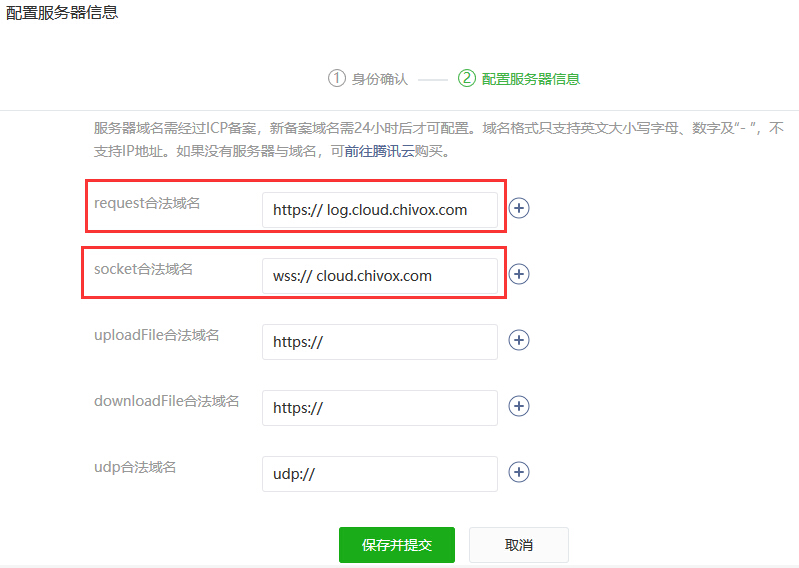
3)Get the reference library ChivoxAiEngine.js
4)Copy ChivoxAiEngine.js to the applet project
5)Reference the ChivoxAiEngine.js module
let aiengine = require('path/to/ChivoxAiEngine.js');
1.Create the engine
createWsEngine(Object object)
Returns an engine object of type ChivoxWsEngine, which can be subsequently evaluated through the interface on this object.
Notice:
Only one evaluation can be performed on an engine object at a time. If you want to submit a review again before the previous review result is returned, you can consider using the queue mechanism. You can also create multiple engine objects, and each engine object can initiate evaluation at the same time. But pay attention to controlling the number of engine objects, otherwise it may cause the evaluation service to be overloaded. Generally, 2 can meet the demand. While the previous engine is waiting for the result, the second engine initiates the evaluation.
Sample
// ref js file
let aiengine = require('path/to/ChivoxAiEngine.js');

// create engine
let wsEngine = aiengine.createWsEngine({});
2.Set up monitoring
The listener must be set after "creating an engine" and before calling any evaluation interface, otherwise it may not receive related events.
1.1 Monitoring evaluation results
onResult(func)
Sets the method for receiving assessment results.
function func parameter: Object res, res is the evaluation result.
Sample:
wsEngine.onResult((res) => {
    console.log(JSON.stringify(res));
    // TODO: add your code here
});
1.2 Monitor error results
onErrorResult(func)
Sets the method for receiving error results.
function func parameter:Object res
Object res
| Attributes | Type | Description | Version |
|---|---|---|---|
| tokenId | String | Evaluation Unique Identifier | 2.0.0 |
| errId | Number | error code | 2.0.0 |
| error | String | error message | 2.0.0 |
Sample:
wsEngine.onErrorResult((res) => {
    console.log(JSON.stringify(res));
    // focus res.errId, res.error
    // TODO: add your code here
});
3.Initiate a request
start(Object options)
When the engine is idle (no profiling requests are being processed), start can be called to start the engine:
- If start has already been called, calling start again will fail;
- It also fails if stop has been called to end the evaluation, but start is called before the evaluation result has been received.
Parameter
Object options
| Attributes | Type | Defaults | Optional | Description | Version |
|---|---|---|---|---|---|
| app | Object | None | Required | The signature verification informationused on connecting to the serverIf the signature has expired, the application layer needs to regenerate this information.f the signature has not expired, this information can be reused. For details, see the description of "Signature Verification Information" below. | 2.0.0 |
| request | Object | None | Required | Evaluation request parameters | 2.0.0 |
| audio | Object | None | Required | Audio format information, see options.audio description below | 2.0.0 |
| success | Function | None | Required | Start success event | 2.0.0 |
| fail | Function | None | Required | start failure event | 2.0.0 |
| complete | Function | None | Optional | Interface call complete event | 2.0.0 |
Options.app
Signature verification information
| Attributes | Type | Defaults | Optional | Description | Version |
|---|---|---|---|---|---|
| applicationId | String | None | Required | appKey provided by Chivox | 2.0.0 |
| sig | String | None | Required | The signature string is generated by the signature algorithm alg(appkey + timestamp + secretKey) | 2.0.0 |
| alg | String | None | Required | The algorithm for generating sig signature currently supports sha256, md5 | 2.0.0 |
| timestamp | String | None | Required | The timestamp when the signature was generated, in milliseconds (ms) | 2.0.0 |
| userId | String | None | Required | The user ID of the business application, please ensure that the userId of each user is unique | 2.0.0 |
Sample signature data
{
	"applicationId": "XXXXXXXXXXXXXXXX",
	"timestamp": "1741680833411",
	"sig": "XXXX4f2XXXXfeecXXXX227cXXXX6cXXXX40XXXX8",
	"alg": "sha256"
}
Reference code Java language click to download PHP language click to download
Options.request
Evaluation request parameters, different kernel request parameters are different, please refer to English kernel , Chinese kernel for details.
Options.audio
| Attributes | type | Defaults | optional | Description | Version |
|---|---|---|---|---|---|
| audioType | String | None | Required | Audio encoding formatCurrently the applet only supports mp3 | 2.0.0 |
| channel | Int | None | Required | The number of channelscurrently only supports mono, fill in 1 | 2.0.0 |
| sampleBytes | Int | None | Required | The number of sampling bytes currently only supports 16 bits, fill in 2 |
2.0.0 |
| sampleRate | Int | None | Required | The audio sampling rateshould be consistent with the actual audio | 2.0.0 |
Options.success
Parameters:Object res
Object res
| Attributes | type | Description | Version |
|---|---|---|---|
| tokenId | string | Unique identifier for this evaluation | 2.0.0 |
Options.fail
Parameters:Object res
Object res
| Attributes | type | Description | Version |
|---|---|---|---|
| errId | number | error code | 2.0.0 |
| error | string | error message | 2.0.0 |
Options.complete
Parameters:none
Sample
wsEngine.start({
    request: {
        coreType: "en.word.score",
        refText: "hello",
        rank: 100,
        attachAudioUrl: 1
    },
    app: app,
    audio: {
        audioType: "mp3",
        channel : 1,
        sampleBytes: 2,
        sampleRate: 16000
    },
    success: (res) => {
        // start success,focus on res.tokenId(Unique identifier for this evaluation)
    },
    fail: (res) => {
        // start fail,focus on res.errId, res.error
    },
    complete: () => {
    }
});
4.Send audio data
feed(Object options)
Send a slice of audio data to the engine. This method can be called only after the above start interface is called successfully.
friendly reminder:
- In the developer tools, the WeChat recorder does not support returning audio fragment data, and a real device must be used.
Parameter
Object options
| Attributes | Type | Defaults | Optional | Description | Version |
|---|---|---|---|---|---|
| Data | ArrayBuffer | None | required | The audio data to be sent, the length cannot be 0 | 2.0.0 |
| Success | Function | None | required | feed success event | 2.0.0 |
| Fail | Function | None | required | feed failure event | 2.0.0 |
| Complete | Function | None | required | Interface call complete event | 2.0.0 |
Options.success
Parameters: None
Options.fail
Parameters:Object res
Object res
| Attributes | Type | Description | Version |
|---|---|---|---|
| ErrId | Number | Error code | 2.0.0 |
| Error | String | Error message | 2.0.0 |
Options.complete
Parameters: none
Sample:
wsEngine.feed({
    data: frameBuffer,	// frameBuffer is audio data of wechat recorder's callback
    success: () => {
        // feed success
    },
    fail: (res) => {
        // feed fail, focus on res.errId, res.error
    },
    complete: () => {}
});
5.End the evaluation
stop(Object options)
When the last piece of audio data is sent, call this method to end the evaluation, and the engine will enter the state of waiting for the result. While waiting for the result, you cannot call start to start a new evaluation until the evaluation result or error result is received.
Parameter
Object options
| Attributes | Type | Defaults | Optional | Description | Version |
|---|---|---|---|---|---|
| Timeout | Int | 60000 | optional | Timeout waiting for the evaluation result, in milliseconds | 2.0.0 |
| Success | Function | None | Required | stop success event | 2.0.0 |
| Fail | Function | None | Required | stop failure event | 2.0.0 |
| Complete | Function | None | Optional | Interface call complete event | 2.0.0 |
Options.success
Parameters: none
Options.fail
Parameters: Object res Object res
| Attributes | Type | Description | Version |
|---|---|---|---|
| ErrId | Number | Error code | 2.0.0 |
| Error | String | Error message | 2.0.0 |
Options.complete
Parameters: none
Sample:
wsEngine.stop({
    success: () => {
        // stop success
    },
    fail: (res) => {
        // stop fail, focus on res.errId, res.error
    },
    complete: () => {}
});
6.Reset the engine
reset()
You can call reset at any time to reset the engine. This method takes effect immediately after the method is called, and there is no asynchronous wait.
If reset is called while evaluating, the evaluation will be canceled immediately, and neither onResult nor onErrorResult will be called back.
After reset, start a new evaluation can be called.
The reset operation will not delete the previously set event listener, so it is not necessary to set the event listener again.
When the callback of the onErrorResult event is received, the engine has already called reset to reset. Therefore, there is no need to call reset to reset again at this time. However, it does not matter if reset is called repeatedly.
This method can be used to:
- When the start/feed/stop call fails, cancel the current evaluation
- Human reasons, want to cancel the current review immediately
7.Other interfaces
Get SDK version number
getVersion()
let version = engine.getVersion(); // version = X.X.X[.X]