
/docs
Unity sdk
0.Integration preparation
Authorized account
- AppKey and SecretKey
- Developer certificate aiengine.provision
Supported operating environment
- Unity version 2017.4 and later
Supported platforms and architectures
| Platform | Architectures |
|---|---|
| Android | x86、armv7(armeabi-v7a)、arm64(arm64-v8a) |
| iOS | All CPU architectures, including emulators |
| Windows | x86(32bits)、x86_64(64bits) |
| Mac | x86_64 |
How to use the Unity SDK
- Build android apps directly with Unity.
- Build Windows applications directly with Unity.
- Build an iOS Xcode project using Unity, then build an iOS APP without making major changes to the project
Not supported by the Unity SDK
- Export the Android project using Unity and then build the Android APP with significant modifications.
- Export the iOS Xcode project using Unity, then build the iOS APP with significant modifications.
- use the Unity SDK in C# projects outside of Unity.
How to import SDK package in Unity projec
Here is how to import the SDK package in Unity 2018.4, as well as other versions of Unity:
- Open Unity and enter the project where you need to import the SDK package.
- Click "Assets" menu, and click "Custom Package..." in "Import Package". The project.
- Select the SDK package to be imported and click Open.
- In the list of files that pop up in Unity, click the "Import" button.
After completing the above steps, the Unity project will add several SDK directories and files to complete the import.
Description of directories and files in the SDK package
The following directories and files belong to the SDK are in the Assets directory:
The home directory of libaiengine
1.Android platform library file libaiengine.so directory
2.Directory for the ios platform library file libaiengine.a
3.Directory for the Windows platform library aiengine. DLL 4.Other files Source files for the classes and interfaces used by the Unity SDKPlugins Specifies the directory used by plug-ins specified by Unity
Android Unity specifies the directory used by Android plugins
AIEngine. Jar jar file
SDK file
| Versions | Updated date | Description |
|---|---|---|
| 2.3.7-2.0.5 | 2025.09.17 | The Android platform supports 16 KB page size alignment |
Integrate the SDK into your project
Overall process
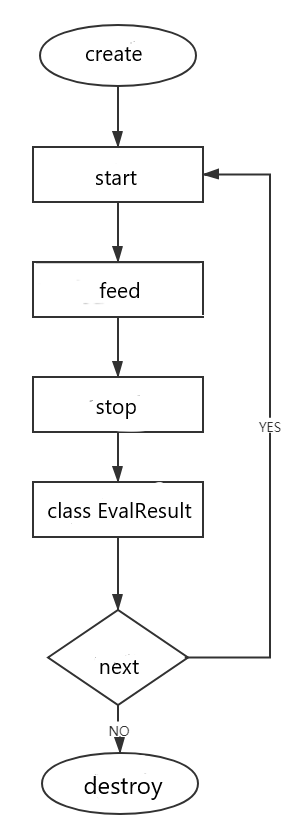
1.Create engine
1.1 Static functions
- public static void Create(JsonData cfg, CreateSuccessCallback successCallback, CreateFailCallback failCallback);
1.2 Function
- Create an evaluation engine. Just create one when the product starts or enters the evaluation module, which can be reused for subsequent evaluation.
1.3 Parameter
| Parameter name | Description |
|---|---|
| Cfg | Engine configuration, in JSON format, including appKey, secretKey, and provision information.For details, see the following CFG parameter description |
| OnCreateSuccess | Create success result callback |
| OnCreateFail | Creation failure result callback |
1.4 Cfg parameter description
| Name | Type | Required | Description |
|---|---|---|---|
| appKey | string | true | Chivox authorized AppKey |
| secretKey | string | true | Chivox authorized secretKey |
| provision | string | true | Chivox authorized certificate path |
| cloud | object | true | |
| - server | string | true | Evaluation server address |
| - connectTimeout | int | false | Timeout time for creating a network connection (in seconds) |
| - serverTimeout | int | false | Timeout from stopping the request to receiving the score result (in seconds) |
| vad | object | false | Voice activity detection |
| - enable | int | false | Default 0. 1, Indicates that the created engine loads the voice activity detection module.。 0, Indicates that the created engine does not load the voice activity detection function。 |
| - res | string | false | vad resources path |
| - sampleRate | int | false | Audio sampling rate, unit is Hz |
| - strip | int | false | Whether to filter the silent frames in the beginning and end, default value is 1, recommend 0 |
| prof | object | false | Log function node |
| - enable | int | false | Default 0. 1, enable log function 0, disable log function It is recommended to enable it during debug and disable it after official release。 |
| - output | String | false | Path for saving log files If the emulator is debugging, you can set this path to the path on the computer for easy access to log files ; If you use the real machine to debug, you can set this path to/dev/stdout,and debugging information is directly displayed in the Xcode debugging window; |
1.5 Create engine sample code
Note: In order to make the engine work normally, please add the following code to the Update function of the MonoBehaviour class
private void Update()
{
	try
	{
		Engine.StaticUnityUpdate();

		if (MEngine != null)
		{
			MEngine.UnityUpdate();
		}
	}
	catch (Exception e)
	{
		Debug.LogWarning("Update caught an exception");
		Debug.LogWarning(e.Message);
		Debug.LogWarning(e.StackTrace);
	}
}
```
Create engine sample code
```C#

    MProvisionPath = AIEngineUtility.CopyStreamingAssets("aiengine.provision");			//Obtaining a Certificate
    MLogPath = Path.Combine(Application.persistentDataPath, "log.txt");
    MRocordPath = Path.Combine(Application.persistentDataPath, "1.wav");
    Engine.SetLogFile(MLogPath);  //
    Debug.Log("provisionPath: " + MProvisionPath); 			//To get the certificate
    Debug.Log("rocordPath: " + MRocordPath);
    Debug.Log("OnButtonInit succeed");

	//cfg
    JsonData cfg = new JsonData();
    cfg["appKey"] = appKey;
    cfg["secretKey"] = secretKey;
    cfg["provision"] = MProvisionPath;
    cfg["cloud"] = new JsonData();
    cfg["cloud"]["server"] = "wss://cloud.chivox.com:443";
	cfg["prof"] = new JsonData();
	cfg["prof"]["enable"] = 1;
	cfg["prof"]["output"] = MLogPath;

	//Create the engine
    Engine.Create(cfg, OnCreateSuccess, OnCreateFail);
    Debug.Log("cfg: " + cfg.ToJson());
    Debug.Log("OnButtonNew succeed");
    //Create a callback function for engine success
    void OnCreateSuccess(Engine engine)
    {
        Debug.Log("Engine Create Success ");
    }
    //Create a callback function for engine failure
    void OnCreateFail(RetValue err)
    {
       Debug.Log("Engine Create Fail" );
    }
2.Launch Evaluation Request
2.1 Function Prototype
- public RetValue Start(AudioSrc audioSrc, out string tokenID, JsonData param, IEvalResultListener listener);
2.2 Fuction
- Initiate evaluation request. After calling, stop or cancel must be called accordingly to ensure that the occupied resources are released.
2.3 Parameter
| Parameter names | Description |
|---|---|
| audioSrc | The source of audio data is divided into two types. The audio parameters support the following two ways of audio data input. 1.Built-in Recording Mode ChivoxAIInnerRecorder; This method has integrated system recorder related operations in the SDK, which is suitable for real-time score scenes, and only supports one audio format:
Read the recorded audio data and send it to the engine to score, which is suitable for scenarios where scores are not instantaneously generated. Evaluation time is positively correlated with audio duration. Support multiple audio formats:
|
| tokenId | If the start call is successful, the tokenId will be written into the ID of this evaluation, which is consistent with the tokenId returned by the evaluation result. |
| param | Evaluation request parameters, see the following evaluation request parameters description. |
| listener | Evaluation result monitor object, please refer to5. Receive Result. |
2.4 Returned Value Description
| Returned Value RetValue.errId | Description |
|---|---|
| 0 | succeed |
| others | fail |
2.5Evaluation Request Parameter Description
| Name | Type | Choice | Description |
|---|---|---|---|
| param | object | Required | Evaluation content. |
| - coreProvideType | string | Required | Setting "cloud" means using online evaluation function. |
| - soundIntensityEnable | int | Optional | Whether to return the volume in real time.The default is 0, if it is set to 1, the volume will be called back through the onSoundIntensity interface in the5. Receive Result.the parameter is "sound_intensity", The value range is 0~100; |
| - vad | object | Optional | Voice activity detection. |
| - - vadEnable | int | Optional | The default value is 0. 1 means the VAD function is enabled in this evaluation. 0 means that the vad function is not enabled for this evaluation. |
| - - refDuration | int | Optional | Set the audio vad delay to take effect (unit: second), block VAD within a few seconds of the first recording. |
| - — speechLowSeek | int | Optional | Sensitivity, the unit is 10ms, set to N, which means that 10*N milliseconds after the speech stops are judged to be over. |
| - app | object | Optional | App related information. |
| - - userId | string | Optional | user ID. It is recommended to fill in the userId according to the user account to facilitate troubleshooting. |
| - audio | object | Required | Audio data. |
| - - audioType | string | Required | Audio encoding format. |
| - - channel | int | Required | Number of audio channels. |
| - - sampleBytes | int | Required | Audio sampling bits |
| - - sampleRate | int | Required | Audio sampling rate. |
| - request | object | Required | Evaluation request, different kernels have different parameters, please refer to English Kernel Doc, Chinese Kernel Doc |
2.6 Recorder Parameters Description
| Name | Type | Choice | Description |
|---|---|---|---|
| audioSrc | object | Required | Recording mode. 1. AudioSrc.InnerRecorder,Represents the built-in recording mode. For details, please refer to the sample code in 2.7.1 below: 2. new AudioSrc.OuterFeed,represents the external recording mode, and the customer needs to implement a sound recorder or read the recorded audio file. See the sample code in 2.7.2 below for details; |
| - recordParam.Duration | int | Required | Recording duration (unit: ms) different kernels have different audio time limit, please refer to English Kernel Doc, Chinese Kernel Doc |
| - recordParam.saveFile | string | Required | The effective path to save the recording file, including the recording file name. null,Represents that the recording file is not saved |
2.7 Code Sample
2.7.1 Built-in Recording Mode Sample Code
    JsonData param = new JsonData();

    param["coreProvideType"] = "cloud";
    param["app"] = new JsonData();
    param["app"]["userId"] = "this-is-user-id";

    param["audio"] = new JsonData();
    param["audio"]["audioType"] = "wav";
    param["audio"]["channel"] = 1;
    param["audio"]["sampleBytes"] = 2;
    param["audio"]["sampleRate"] = 16000;
    param["request"] = new JsonData();

    param["request"]["coreType"] = "en.sent.score";

    param["request"]["refText"] = "I know the place very well.";
    string tokenID;

    AudioSrc.InnerRecorder audioSrc = new AudioSrc.InnerRecorder
    {
        recordParam = new ChivoxMedia.RecordParam
        {
            Duration = 5500,
            SaveFile = MRocordPath
        }
    };
    MEngine.Start(audioSrc, out tokenID, param, MListener);
    }
2.7.2 Sample code for external recording mode
JsonData param = new JsonData();

param["coreProvideType"] = "cloud";

param["app"] = new JsonData();
param["app"]["userId"] = "this-is-user-id";

param["audio"] = new JsonData();
param["audio"]["audioType"] = "wav";
param["audio"]["channel"] = 1;
param["audio"]["sampleBytes"] = 2;
param["audio"]["sampleRate"] = 16000;
param["request"] = new JsonData();
param["request"]["coreType"] = "en.sent.score";
param["request"]["refText"] = "I know the place very well.";
string tokenID;
MEngine.Start(new AudioSrc.OuterFeed(), out tokenID, param, MListener);
FileStream file = new FileStream(MWavPath, FileMode.Open, FileAccess.Read);
file.Seek(44, SeekOrigin.Begin);
byte[] buf = new byte[3200];
int bytes;
while ((bytes = file.Read(buf, 0, 3200)) > 0)
    {
        MEngine.Feed(buf, bytes);
    }
file.Close();
3.Send Audio Data
3.1Method Prototype
- public RetValue Feed(byte[] data, int length);
3.2 Funtion
- The external recording mode needs to call this method to transfer audio data, the internal recording mode does not need this method.
3.3 Parameters
bytes: Audio data.
length: The length of data.
3.4Returned Value Description
- RetValue.errId == 0 //It means the call is successful, otherwise it means the call failed.
Sample Code:
    FileStream file = new FileStream(MWavPath, FileMode.Open, FileAccess.Read);
        file.Seek(44, SeekOrigin.Begin);
        byte[] buf = new byte[3200];
        int bytes;
        while ((bytes = file.Read(buf, 0, 3200)) > 0)
        {
            MEngine.Feed(buf, bytes);
        }
                file.Close();
4.Stop the request
4.1 Method Prototype
- public RetValue Stop();
4.2 Function
- Call this method when you need to stop sending audio or end recording. After calling this method, it will enter the state of waiting for the evaluation result.
Note: The stop method must be called in a pair with Launch Evaluation Request, otherwise the start will report an error next time. If the recording duration is specified when using the built-in recording evaluation, then when the recording duration arrives, stop will be automatically called inside the SDK, and the business layer does not need to call it.
4.3Returned Value Description
- RetValue.errId == 0 means the call works and succeed. Otherwise it means the call fails.
4.4 Sample Code
MEngine.Stop();
5.Receive result
5.1 Result Listener interface
public interface IEvalResultListener;
- This interface is set by the listener parameter in the request interfaceLaunch Evaluation Request
    //Wrong with Evaluation.
    void OnError(string tokenID, EvalResult result);
    //Evaluation result.
    void OnEvalResult(string tokenID, EvalResult result);
    //Binary result returned.
    void OnBinResult(string tokenID, EvalResult result);
    //Sound intensity.
    void OnSoundIntensity(string tokenID, EvalResult result);
    //Reserved expansion interface.
    void OnOther(string tokenID, EvalResult result);
5.2Return Result Code Example:
public class AIEngineTestEvalResultListener : IEvalResultListener
{
    private static void PrintResult(string tokenID, EvalResult result)
    {
        try
        {
            if (result.RecFilePath != null)
            {
                AIEngineTest.MInstance.MAudioPath = result.RecFilePath;
            }
            Debug.Log("On Result");
            Debug.Log("tokenID: " + tokenID);
            Debug.Log("tokenID: " + result.TokenID);
            Debug.Log("result: " + result.Text);
            Debug.Log("path: " + result.RecFilePath);
        }
        catch (Exception e)
        {
            Debug.LogWarning("PrintResult caught an exception");
            Debug.LogWarning(e.Message);
            Debug.LogWarning(e.StackTrace);
        }
    }

    public void OnError(string tokenID, EvalResult result)
    {
        PrintResult(tokenID, result);
    }

    public void OnEvalResult(string tokenID, EvalResult result)
    {
        PrintResult(tokenID, result);
    }

    public void OnBinResult(string tokenID, EvalResult result)
    {
        PrintResult(tokenID, result);
    }

    public void OnSoundIntensity(string tokenID, EvalResult result)
    {
        PrintResult(tokenID, result);
    }

    public void OnOther(string tokenID, EvalResult result)
    {
        PrintResult(tokenID, result);
    }
}
6.Cancel evaluation
6.1 Method Prototype
- public RetValue Cancel();
6.2Function
- After calling this method, the current evaluation request will be cancelled.
Note: If you call cancel interface after calling start interface, you can call stop interface without pairing.
6.3 Code Sample
// Cancel to get evalution result
MEngine.Cancel();
7. Replay Recording
7.1Method Prototype
public class AudioPlayer;
Static method: SharedInstance public static AudioPlayer SharedInstance();
Fuction:Return singleton
Method: SetAudioSource
void play(String path, final Listener listener);
Fuction:Play the audio
Parameter: audioSource, The unity object to play the audio.
Method: PlayOneShot
fuction:Play the audio
parameter path:audio file path
method: Cancel public void Cancel(); Function:cancel to replay recording.
7.2Replay Recording Code Sample
    ChivoxMedia.AudioPlayer.SharedInstance().MAudioSource = GetComponent<AudioSource>();
    ChivoxMedia.AudioPlayer.SharedInstance().PlayOneShot(MAudioPath);
8.Destroy Engine
8.1 Method Prototype
- public void Destroy();
8.2 Function
- Destroy the engine and release resources. After the engine is destroyed, it cannot be used for evaluation again.
Note: If you have never called this method, this method will be called automatically when the engine object is GC by the virtual machine. But the timing of engine objects being GC cannot be guaranteed, so it is recommended to call destroy manually.
8.3 Code Sample
MEngine = null;
9. Other interface
Get SDK version
		SDKInfo sdkinfo = Engine.SDKInfo;

		string sdkVersion = sdkinfo.CommonSDKVersion + "-" + sdkinfo.Version;

		Debug.Log("sdkVersion:"+ sdkVersion);