
/docs
http
0.Prepare
Authorized account
- AppKey
- SecretKey
1. Protocol
Service Address:eval.cloud.chivox.com
Communication Protocol:https
Character Encoding:utf-8
2. Public head
2.1 request
| Name | Required | Description |
|---|---|---|
| Host | true Note:If the interface is called in the browser, the browser will automatically fill in this header without making it manually |
eval.cloud.chivox.com |
| Cookie | /aieval/init false /aieval/record/*true |
Take a valid cookie from the cookie cache and fill in the head.Additional note: /aieval/init interface responds to Set-Cookie, the client should cache the cookie value, followed by call /aieval/record//feed and/aieval/record//fetch interface according to the cached cookie to fill in this header. |
| Content-Type | true | Defined by individual interfaces. |
2.2 Response
| Name | Required | Description |
|---|---|---|
| Set-Cookie | true | Clients should cache cookies. The cookie is then brought with it according to cookie rules whenever the client initiates a request.If you are calling the interface in a browser, set the withCredentials property of the ajax request so that the browser will accept the set-cookie response from the serviceside |
| Content-Type | true | Always application/json |
3. Response information
3.1 HTTP status code
A status code of a non-200 is received indicating that the request was not processed by the server.。
A 200 status code was received indicating that the server had processed the request. At this point, the data in Body needs to be further parsed to determine the results of server processing。
3.2. The service side returns the results in Body
The service side returns the results in Body. The data in Body returned by different interfaces has different structures, so parse them according to the description of each interface.
3.3. Body contains error codes
When the body returned by the service side contains a property and the value is not 0, an error occurs with the current request.errId
4. Interface description
Interface list
- Create a evaluation session /aieval/init
- Transfer audio data /aieval/record/(recordId)/feed
- Get the evaluation results in real time /aieval/record/(recordId)/fetch
- Destroy the evaluation session /aieval/record/(recordId)/release
Overall process
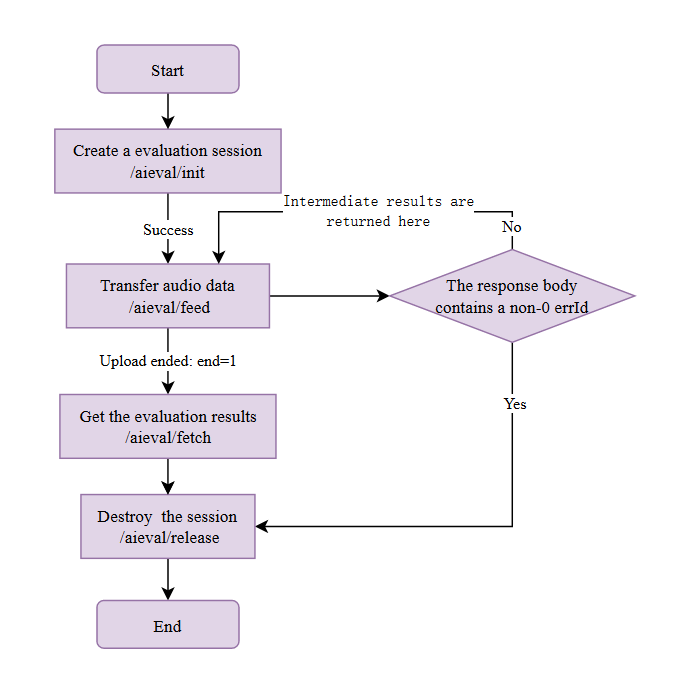
4.1 Create a evaluation session
POST /aieval/init?ver=2&appKey=x&traceId=x
A evaluation session must be created before each evaluation, and the call successfully returns a unique identity for this session, which is then used to transmit audio data and obtain evaluation results.recordIdrecordId。
session retention
After a evaluation session is created, the server keeps the session for a period of time. If the client does not upload audio data to the session within this period, the session expires and will be deleted. The current session duration on the server is 60 seconds.
Note: If you call the interface in a browser, set the withCredentials property of ajax to true, otherwise the browser side will not be able to use cross-domain cookies that respond on the service side.
HTTP REQUEST
> URL Parameters
- ver: [necessary] Specifies the version of the service interface.
- appKey: [necessary] Chivox appKey.
- traceId: [nonessential ] The client fills in an Id number, which is recorded by the server. You can track logs with YourId to help troubleshoot problems.
> Request header
- Content-Type:application/json;charset=utf-8
> Request Body
{
  // [necessary] The user passes in the tokenId and the result is returned as same
  "tokenId": string,

  // [nonessential] Set the maximum time for the server to wait for the evaluation result after all audio data is sent, [60-180] seconds
  "serverTimeout": int,

  // [necessary] Identity information
  "app": {
    "applicationId": string,	// [necessary] Chivox	appKey。
    "sig": string,						// [necessary] The signature character string is generated by the signature algorithm ALG (appKey + timestamp + secretKey).
    "alg": "sha256",					// [necessary] Generates the signature algorithm of the SIG
    "timestamp": string,			// [necessary] The UNIX timestamp that generates the signature, in milliseconds
    "userId": string, 				// [nonessential] User ID of a service application
  },

  // [necessary] For details about the audio parameters, see the description of supported audio formats below
  "audio": {
    "audioType": string, 	// audio format
    "channel": 1,			// audion channel number
    "sampleBytes": 2,		// sampling byte
    "sampleRate": 16000 	// sampling rate
  },

  // [necessary] core parameters. Different core have different parameter contents. Please refer to the core parameter documentation in the list on the left
  "request": {
    // ...
  }
}
Supported audio format
| Format | Sample rate | Bytes | Channel |
|---|---|---|---|
| wav | 16000 | 2 | 1 |
| mp3 | 16000 | 2 | 1 |
| mp3 | 44100 | 2 | 1 |
| ogg | 16000 | 2 | 1 |
HTTP RESPONSE
> Status code
A status code that is not 200, indicating that the server failed to process the request properly.
200 status code indicating that the server has processed the request. At this point, the data in Body needs to be further parsed to determine the results of the server's processing.
> Response header
Content-Type:application/json;charset=utf-8
Set-Cookie:
If the creation of the evaluation session is successful, the response will contain a Set-cookie header. The client should cache the cookie and fill in the request header when later requesting the/aieval/record/$'recordId'/'interface.'
> Respond to Body
The session was created successfully
If there are no properties in the response Body, or even if there are properties but their value is 0, the session was created successfully. At this point Body content:errIderrId
{
  "recordId": string,                    // Unique identifier for this profiling session
  "accessToken": string              // This session access token is evaluated.
}
The session failed to be created
There is and is not 0 in the response Body, indicating that the session was created failed. At this point Body content:errIderrId
{
  "errId": number,            // error code. For details, see error code description
  "error": string,             // error description
  "errDomain": string,     // error domain
}
4.2 Transfer audio data
POST /aieval/record/${recordId}/feed?ver=2&appKey=x&accessToken=x
Send audio fragment data to the server. It's recommended that the data size of each audio fragment is between 3200 bytes and 32000 bytes. If the value is too low, the total number of requests will increase, thereby wasting network traffic; if the value is too high, the time it takes to complete each feed request will increase. There are two ways to input the audio data
1.Microphone real-time audio data
It's suitable for instant score scenarios2.Recorded audio files
It's suitable for scenarios where scores are not obtained immediately. The evaluation time is related to the audio duration. The longer the audio, the longer the evaluation time.
Note: choose a different usage method based on the product business scenario, and if you are not sure which one to use, contact technical support.
Session retention
Each time the server receives uploaded audio data, the session preservation is reset. The next audio upload operation must be within the duration of the session. Otherwise, the server will delete the session after the session times out. The current session duration after reset is 60 seconds.
Note: If you call the interface in a browser, set the withCredentials property of ajax to true, otherwise the browser side will not be able to use cross-domain cookies that respond on the service side.
HTTP REQUEST
> URL parameters
- ver: [necessary] Specifies the version of the service interface
- appKey: [necessary] Chivox appKey.
- accessToken: [necessary] AccessToken returned when the profiling session is created.
> request header
Content-type
multipart/form-datatypeCookie Cookie value, which is what is returned by calling the response header that creates the evaluation session interface in 3.1Set-Cookie
> request Body
Form in format that contains fields:multipart/form-data:
feed: (necessary) audio description information, Content-Type: application/json
{
  // [necessary] Serial number of audio fragment data.  Increment from 0, must not leak number continuously.  The server will use this serial number to restore the audio fragment to the original audio.
  "seq": number,
  // [nonessential] End identifier of audio data.  1 indicates the end. 0 indicates the end.  When the server receives the end of audio flag, the audio shard with a larger serial number is ignored.  The default value is 0.
  "end": 0|1
}
fetch: [nonessential] Specifies whether or not this request gets intermediate profiling results. If the client does not need to obtain intermediate results, this field can be omitted. If the client needs to get intermediate results, this field can be added to the next feed after every N feeds (N is determined by the client based on the amount of data uploaded). Content-Type: application/json
{
  // Gets the starting ordinal of the intermediate result.  For the first time, fill in 0 for the intermediate result. For the second time, fill in 1 for the maximum number of the intermediate result that has been received before.
  "midseq": number
}
data: [necessary] audio shard data.Content-Type: application/octet-stream
It is recommended that the size of the audio shard data sent per feed be: 3200 to 32,000 bytes.
HTTP RESPONSE
If the client receives a response timeout for this interface, it can send the shard data for that serial number again until it receives a response. however, if the number of reisuses reaches the upper limit (the client defines the upper limit itself), it can be determined that the evaluation failed, at which point the client should end the evaluation and throw an error.
> HTTP RESPONSE
The status code is not 200, indicating that the service side is abnormal, can be judged as a evaluation failure, at this time the client should end the evaluation, throw an error.
The status code is 200, and the data in Body needs to be further parsed to determine if It contains a non-0 attribute:errId
If Body contains a non-0 property that indicates an error in the request parameter or a service-side exception, it can be determined to be a failure of the evaluation, at which point the client should end the evaluation and throw an error.errId
If there are no properties other than 0 in Body, the server has accepted audio shard data. You should continue to determine if The Body contains attributes (see the description in the Response Body section below).errIdfinalResult
> Response header
- Content-type: application/json
> Respond to Body
The service side rejects shard data
Body contains a non-0 attribute indicating that the shard data uploaded this time was rejected. The Body content at this point is:errId:
{
  "errId": number,            // error code
  "error": string,             // error description
  "errDomain": string,     // error domain
}
Shard data has been accepted by the service side
There are no non-0 attributes in Body to indicate that the shard data uploaded this time has been accepted.errId
At this point, you need to determine whether the Body of the response contains properties:finalResult:
If there are no properties, the service-side evaluation is in progress.finalResult
Body:
{} // An empty objectOr Body contains intermediate results:
{
  "midResults": {
    // key - The ordinal number of the intermediate result, value - intermediate result.  Refer to the kernel documentation for the structure of the results.
    "0": { ... },
    "1": { ... },
    "2": { ... }
  }
}
If a property is included, the service-side evaluation has ended. at this point, the client should determine whether the object contains a non-0 property:finalResultfinalResulterrId
If the object contains a non-0 property, indicating an error during the evaluation process, the client should end the evaluation and throw the error.finalResulterrId
Body:
{
  "finalResult": {
    "errId": xxxxx,
    "error": "xxxxx",
    ...
  }
}
If the image does not contain a non-0 attribute, indicating that the evaluation is over and error-free, the client should end the evaluation.finalResulterrId
Body:
{
  "finalResult": {
    ...
  }
}
Note: this generally does not happen because the server takes a period of processing after the last audio shard is sent to produce the final result. so after sending the last audio shard, call the 3.3 real-time pull evaluation results interface below to get the final evaluation results.
4.3 Get the evaluation results in real time
GET /aieval/record/${recordId}/fetch?ver=2&appKey=x&midseq=seq&wait=n&accessToken=x
get the results of your reviews in real time.
when the service side produces a evaluation result, it caches the results for the client to get. the time at which the service side caches the results is determined by the following rules::
After all the audio in The Feed, the evaluation session will expire after 60 seconds, and the evaluation results will be obtained through this interface after the session expires.serverTimeout
if the evaluation results are not generated when this interface is called, the service side waits for the wait seconds before responding to the client. as soon as the intermediate/final result is produced during the wait time of the wait second, it will respond to the client immediately.
After the client receives a response from this interface, determine if the body contains the final result. If there is no final result, call this interface again after a short delay to get the result. After the client has transferred the last audio data, if it has not received the final result for more than a certain amount of time (which the client customizes), terminate the current evaluation business and throw an error.
Note: If you call the interface in a browser, set the withCredentials property of ajax to true, otherwise the browser side will not be able to use cross-domain cookies that respond on the service side.
HTTP REQUEST
> URL parameters
- ver: [necessary] Specifies the version of the service interface
- appKey: [necessary] Chivox appKey.
- midseq: [nonessential] Query the start sequence number of intermediate results. If you do not need to obtain intermediate results, do not set this parameter. Fill in 0 when the intermediate result is pulled for the first time, and add 1 to the maximum number of the intermediate result that has been received before when it is retrieved again.
- wait: [nonessential] The time to wait for the result of this request. Unit: second. The default value is 20. Upper limit: 60.
- accessToken: [necessary] AccessToken returned when the profiling session is created.
HTTP RESPONSE
> status code
- A status code that is not 200, indicating that the server failed to process the request properly.
- 200 status code indicating that the server has processed the request. At this point, the data in Body needs to be further parsed to determine the results of the server's processing.
> response header
- Content-type: application/json
> respond to Body
- There was an error on the service side
Body contains a non-0 attribute that indicates an error on the service side. Body content is:errId:
{
  "errId": number,			// error code
  "error": string, 			// errid description
  "errDomain": string, 	// error domain
}
No evaluation results have been produced for the time being
There are no non-0 attributes in Body or, and there are no, and attributes in Body, indicating that no evaluation results have been generated at this time. Body content is:errIdmidResultsfinalResultbinResult
{} // An empty objectIntermediate results were produced
There are no properties in Body that are not 0, and there are properties in Body that indicate that this response returns intermediate results, and Body content is:errIdmidResults
{
  // intermediate result
  "midResults": {
    // key - The ordinal number of the intermediate result, value - intermediate result.  The specific structure and parameter meanings vary according to the corType you pass in. Please refer to the corresponding [core documentation] on the left.
    "0": { ... },
    "1": { ... },
    "2": { ... }
  }
}
The end result
If there are no properties in Body that are not 0, and there are properties in Body, this response returns the final result. Body content is:errIdfinalResultbinResult:
{
  // Final result, specific structure and parameter meaning depending on the coreType you pass in, please refer to the corresponding [Kernel doc] on the left.
  "finalResult": {...}
}
4.4 Asynchronously obtain the evaluation results
After the audio data has been transmitted (call feed interface end=1), the call feed interface can call the following interface asynchronous query if it receives a 20008 (unseen evaluation session) error code indicating that the evaluation session has expired and has been deleted.
If the evaluation corresponding to the recordId on the service side is successfully concluded, the evaluation results can be queried through this interface, but if the evaluation is actually failed, the evaluation results cannot be queried through this interface.
HTTP REQUEST
> request URL
>request method
- GET
> > URL parameters
| Name | Required | Type | Description |
|---|---|---|---|
| applicationId | teue | string | Customer Identification (AppKey) |
| timestamp | teue | string | Unix timestamp (precision: milliseconds) |
| sig | true | string | sig signature: alg (appKey-timestamp-secretKey) |
| alg | false | string | the algorithm used to calculate sig supports only three values: "sha1", "md5" and "sha256", so use sha1 to calculate sig when not passing this parameter |
> request header
- Content-Type:application/json
HTTP RESPONSE
> status code
The server returns a 200 status code after processing the request normally. After the client receives the 200 status code, the response results in Body should be resolved.。
> response header
- Content-Type: application/json;charset=utf-8
> respond to Body
If there are no evaluation results, the Body content is empty json:
{}If there are evaluation results, the Body content is:
{
…
}
If an error occurs, Body contains the errId property and the value is not 0, which reads:
{
   finalResult:{
      ...
      "errId":xxxx,
      "error":"xxxxxx"
      ...
   }
}
Error code below for a specific error code description 5.Service error code
4.5 Destroy the evaluation session
GET /aieval/record/${recordId}/release?ver=2&appKey=x&accessToken=x
When the client has completed the evaluation or needs to cancel the evaluation, call this interface to notify the service side to destroy the evaluation session.
After the evaluation session is destroyed, the response to the ongoing feed and fetch requests is undefined and the client should cancel these ongoing feed and fetch requests.
Note: If you call the interface in a browser, set the withCredentials property of ajax to true, otherwise the browser side will not be able to use cross-domain cookies that respond on the service side.
HTTP REQUEST
> URL parameters
- ver: [necessary] Specifies the version of the service interface.
- appKey: [necessary] Chivox appKey.
- accessToken: [necessary] AccessToken returned when the profiling session is created
HTTP RESPONSE
> status code
- A status code that is not 200, indicating that the server failed to process the request properly.
- 200 status code indicating that the server has processed the request. At this point, the data in Body needs to be further parsed to determine the results of the server's processing.
> response header
- Content-Type: application/json
> respond to Body
Successfully, Body content is:
{} // An empty objectAn error occurred and the Body content is:
{
  "errId": number,            // error code
  "error": string,             // error description
  "errDomain": string,     // error domain
}
5. Service error code
5.1 Asynchronously obtain the evaluation result interface error code
| Error code | Description |
|---|---|
| 80001 | RecordId is illegal: recordId can only consist of numbers and the letter a-f (case indistinguishable) and must be 24 in length |
| 80002 | The required parameters are missing, or the parameter type is incorrect, see the return information for details |
| 80003 | The applicationId parameter is not a chi-sound-authorized appKey |
| 80004 | The timestamp parameter has expired for 1 hour |
| 80005 | The sig parameter validation failed |
| 80006 | The alg parameter is not valid |
| 80007 | The applicationId parameter does not match the applicationId value in the evaluation results represented by recordId |
| 80008 | The server-side database is abnormal and will be retried later, such as returning the error multiple times over a long period of time, to contact the developer |
| 80009 | The service side gets the seekKey error and tries again later, contacting the developer if the error is returned multiple times for a long time |
5.2 Other error codes
| Error code | Description |
|---|---|
| 20000 | Exceptions are handled internally on the service side |
| 20001 | The HTTP method requested by the client is illegal |
| 20002 | The Autonization check failed in the http header requested by the client |
| 20003 | ContentType in the head of http requested by the client is illegal |
| 20004 | The service side reads the HTTP Body exception |
| 20005 | The HTTP Body requested by the client is illegal |
| 20006 | The parameter content requested by the client is illegal |
| 20007 | The URI requested by the client is illegal |
| 20008 | The client requested recordId does not have a corresponding evaluation session on the service side |
| 20009 | The client request exception is forwarded internally by the service side |
| 20010 | The service side receives a ginger exception to close the connection (close the connection before responding to the results) |
| 20011 | The service side communicates with ginger abnormally |
| 20012 | The N in the parameter ver-N that the client fills in the URL is not supported |
| 20013 | The service side waits for the ginger result to time out |
| 20014 | authentication failed and the client requested an error in authentication information |
| 20015 | The client requested that the access to Token be illegal |